The Weekly Shorts Workflow for Busy Creators
A practical weekly workflow for busy creators who want to turn one long video into multiple Shorts, review AI suggestions, and schedule clips consistently without starting from scratch every day.
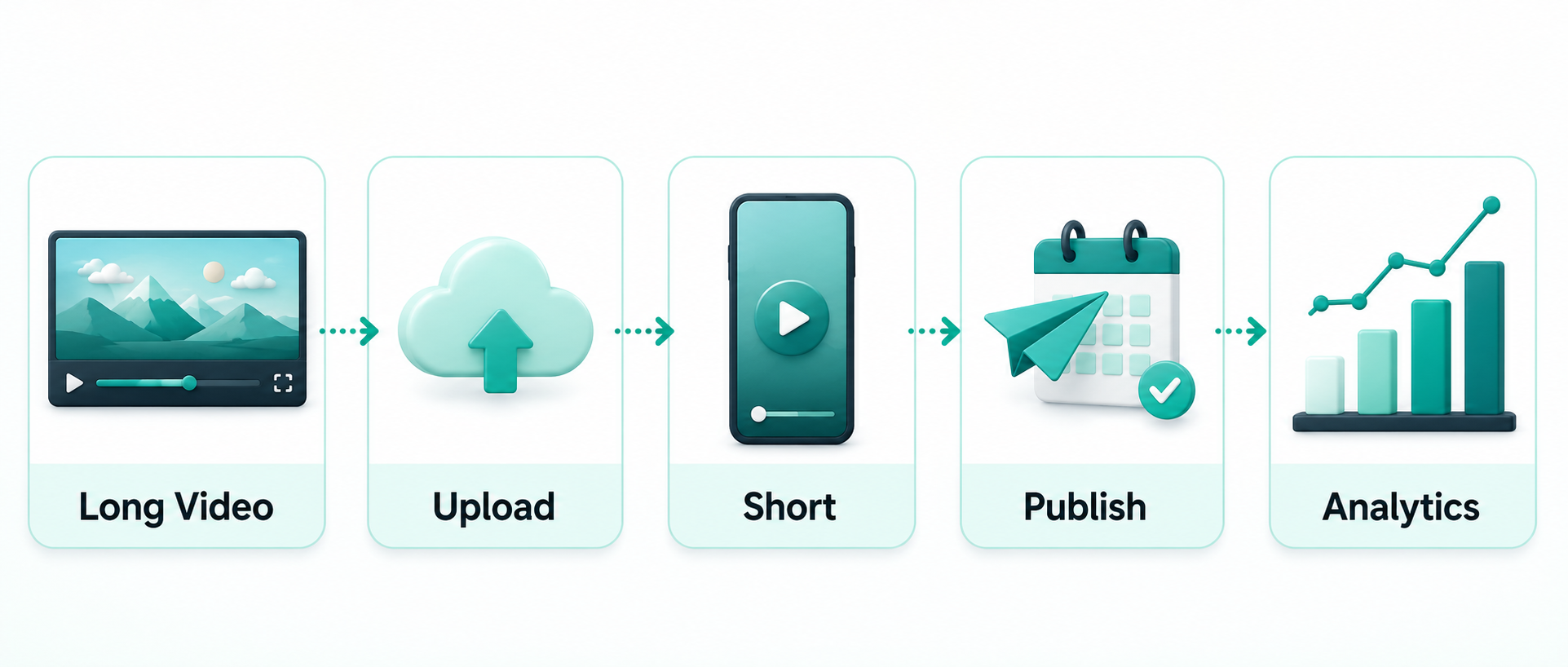
You can follow this weekly Shorts workflow inside MintiStudio.
Start free with MintiStudio
Why busy creators need a weekly Shorts workflow
Short-form video works best when it becomes a repeatable system, not a last-minute task.
If you already record long videos, podcasts, lessons, interviews, webinars, talks, or coaching content, you probably have enough material for multiple Shorts each week. The hard part is not always finding content. The hard part is turning that content into a steady publishing rhythm without adding another full-time job to your week.
Without a workflow, creators often fall into one of two patterns. They publish in bursts when they finally have time, or they stop posting because every Short feels like a brand-new editing project.
A weekly Shorts workflow helps you avoid both. You start with one long video, find the strongest moments, turn those moments into short clips, and schedule them across the week.
Why Shorts help long-form creators
Shorts can help long-form creators in a few practical ways.
They give your best ideas more chances to be discovered. A viewer who may never watch a 45-minute video can still connect with one clear 40-second moment. Shorts can also bring older long-form content back into circulation, especially when you have a library of videos that still contain useful ideas.
Short clips are also easier to test. You can learn which topics, hooks, questions, or stories your audience responds to before planning the next long video.
The goal is not to replace long-form content. The goal is to make every long-form video work harder.
How many Shorts should you create from one long video?
A good starting point is three to five Shorts from one strong long-form video.
That is not a strict rule. Some videos may only contain one or two strong clips. Others may contain ten. But for busy creators, three to five is a realistic weekly target because it gives you enough content to stay visible without turning the process into a production burden.
A useful Short should:
- stand on its own
- deliver one clear idea
- have a natural beginning and ending
- fit your channel’s tone
- be worth publishing under your name
If a moment needs too much context from the full video, it may not be a good Short.
Step 1: Pick one strong source video
Start with one long video that already has useful ideas inside it. This could be a podcast episode, educational video, webinar, sermon, coaching session, or expert interview.
The best source videos usually include:
- clear explanations
- direct advice
- strong answers to common questions
- short stories
- examples
- surprising points
- emotional or memorable moments
Do not start by asking, “How many clips can I squeeze out of this?” Start by asking, “Which moments would still help someone if they saw them by themselves?”
That question keeps the workflow focused on quality.
Step 2: Use the transcript to find strong moments
A transcript makes the weekly workflow much easier.
Instead of scrubbing through the entire video manually, you can scan the spoken content and quickly find sections that are clear, useful, or shareable. This is especially helpful for educational creators, coaches, psychologists, podcasters, and speakers, because the strongest moments are often hidden inside longer explanations.

When reviewing the transcript, look for:
- one clear idea
- short and strong sentences
- question-and-answer moments
- direct advice to the viewer
- the strongest part of a story
- a correction of a common misunderstanding
The transcript also helps with caption quality. The cleaner the transcript is, the more professional the final captions will feel.
Step 3: Let AI suggest candidates, but keep the final decision
AI can save time by finding candidate clips from the full video. That removes the blank-page problem and gives you a set of options to review.
But AI suggestions should be treated as candidates, not final decisions.
The creator still needs to decide what is accurate, on-brand, useful, and worth publishing. That matters because every Short represents your channel.
A good workflow looks like this:
- AI suggests candidate clips.
- You review the candidates.
- You choose the clips that fit.
- You adjust the title, start point, or end point if needed.
- You publish only the clips you actually want representing your channel.
This gives you speed without giving up editorial control.
Step 4: Keep the style consistent
Busy creators do not need to redesign every Short from scratch.
Once you find a style that works, keep it consistent. That makes your content easier to recognize and saves time during production.
A simple style system usually includes:
- vertical 9:16 framing
- readable captions
- clean crop around the speaker
- simple title or hook text
- consistent colors
- consistent layout
- a background that does not distract from the message
Consistency does not mean every clip should feel identical. It means the viewer should quickly understand that the clip belongs to your channel.
Step 5: Schedule Shorts across the week
If you create three to five Shorts from one long video, spreading them across several days is usually healthier than publishing everything at once.
This gives each clip its own publishing moment. It also gives you more chances to learn from performance before the next batch goes out.
YouTube’s own Help Center guidance supports this direction. YouTube says a consistent, sustainable release schedule is important for building audience expectations and protecting creator well-being. YouTube also recommends avoiding bulk publishing and notes that viewers can receive a maximum of three new video notifications from one channel within a 24-hour period.
Sources:
- YouTube Help: Upload schedule tips
- YouTube Help: Fix subscriber notification problems
- YouTube Help: Skip sending upload notifications
A practical starting rhythm could be:
- 3 Shorts per week if you want a light schedule
- 5 Shorts per week if you want one weekday clip
- 2 to 3 Shorts per day only if you already have enough distinct clips and can sustain that pace
The key is sustainability. A schedule you can repeat for months is more valuable than one intense week you cannot maintain.
Step 6: Learn from performance
A weekly workflow gets better when you review what worked.
Look at which clips earned stronger early views, comments, saves, or engagement. Then use that signal when choosing moments from the next long video.
Over time, you may learn that your audience responds best to:
- direct answers
- practical tips
- emotional stories
- strong opinions
- common mistakes
- short explanations
That feedback makes the next batch easier to choose.
When to do it yourself and when to delegate it
There are two honest ways to run a weekly Shorts workflow.
The first is hands-on. You upload the video, review the transcript, choose the clips, style them, and schedule the posts yourself. This is a good fit if you want full creative control and enjoy shaping the final clips.
The second is managed. You still create the long-form content, but someone else handles the operational work: finding the best moments, preparing the vertical clips, cleaning captions, scheduling posts, and keeping the publishing rhythm moving.
Neither option is automatically better. The right choice depends on where your time creates the most value.
If your best work is recording, teaching, interviewing, coaching, or speaking, it may not make sense to spend your limited hours inside the editing and scheduling process every week.
Where MintiStudio fits
MintiStudio is built around this weekly workflow.
If you want to do it yourself, you can use MintiStudio to upload long videos, review transcripts, get AI clip suggestions, edit Shorts, and schedule them across platforms.
If you want the outcome without managing every step, MintiStudio Autopilot follows the same workflow for you. The editor team uses MintiStudio to turn your long videos into Shorts, prepare them for publishing, and keep your schedule moving, so you can stay focused on creating the original content.
The goal is not to publish more for the sake of volume. The goal is to turn one recording session into a steady, controlled publishing rhythm.
Next step
Start with one long video this week. Choose three to five moments that stand on their own, turn them into Shorts, and schedule them across the next few days.
A weekly Shorts workflow gives you consistency without forcing you to start from scratch every time.
More from the blog
YouTube Shorts for Consultants: A Practical Workflow for Public Proof Without Sharing Client Confidentials
Consultants often have strong expertise locked inside private calls, workshops, and explainers. This guide shows how to turn those long recordings into buyer-relevant Shorts that build public proof, while keeping confidential details out of the workflow.

Turn Prospect Objections into Your Next Teaching Video
Use the questions prospects ask on sales calls to plan teaching videos that answer real objections, show your thinking, and create standalone moments that can become Shorts. This guide gives coaches and consultants a simple way to turn one conversation topic into a useful long video and a set of clip-ready lessons.