Best OpusClip Alternatives for Busy Experts Who Need Less Clipping Work
A practical comparison of OpusClip alternatives for solo educators, coaches, consultants, and podcasters who want less weekly clipping work. See which tools fit self-serve editing, planning, publishing, and done-for-you Autopilot workflows.

The right clipping tool should reduce your weekly work, not add another one.
If you are comparing opusclip alternatives, you probably do not need more feature noise. You need a clear answer to a simple question: which tool fits the way you actually work each week?
For solo experts, the bottleneck is usually not making one clip. It is finding the right moment, shaping it for Shorts, keeping captions readable, and getting a steady publishing rhythm without turning clipping into a second job.
This guide compares the most relevant options for that problem. OpusClip is the reference point many creators start from. The alternatives below are the tools that matter most if you want less operational work and a clearer path from long video to Shorts.
What matters when you compare clipping tools
Before you compare plan pages, look at the work you want removed from your week.
You are usually trying to solve one or more of these problems:
- finding the strongest moment in a long recording
- turning horizontal video into vertical Shorts
- keeping captions and titles readable
- scheduling posts instead of exporting manually
- reviewing clips before they go live
- tracking what happens after publishing
That means a good comparison is not only about clip quality. It is about how much of the workflow the tool takes off your plate.
The shortlist
For this topic, three alternatives stand out from the available verified feature sets:
- Klap
- Vizard
- MintiStudio
OpusClip stays the reference point because many readers already know the category. The question is not whether it can clip video. The question is which option fits your workload and publishing style better.
Quick comparison
| Tool | Best fit | Standout workflow strength | Tradeoff |
|---|---|---|---|
| OpusClip | Self-serve clipping with a broad feature set | AI clipping, captions, reframing, scheduling, and higher-tier editing depth | You still manage the workflow yourself |
| Klap | High-volume clipping and multi-account publishing | AI clipping, unlimited social accounts, analytics | Plan details are less explicit about the broader workflow |
| Vizard | Hands-on editing and team-style publishing | Full editor, auto subtitling, translation, B-roll, direct publishing | Best when you want to stay involved |
| MintiStudio | Done-for-you long-video-to-Shorts workflow | Autopilot prepares, reviews, and publishes Shorts for you | Built for less hands-on control, not more |
OpusClip as the baseline
OpusClip is a capable clipping platform with AI clipping, animated captions, reframing, scheduling, and stronger editing features on higher tiers. It is a reasonable baseline if you want a familiar self-serve workflow and do not mind managing the process yourself.
Its feature set is broad. The higher tiers add support for more sources, social scheduling, brand assets, B-roll, export integrations, and team-oriented features. That makes it useful when you want an editing tool with room to grow.
For readers who want less weekly work, though, the real question is whether you want a tool to operate or a workflow to be handled for you.
Klap: good when you want clipping volume and analytics
Klap is the simplest of the three to describe: it offers AI clipping, unlimited social accounts, and analytics across all plans.
That makes it a strong fit if your main concern is getting clips produced and shipped without being locked to a tiny account limit. The public plan page does not clearly spell out the included workflow details beyond the core features, so the value is mostly in the broad clipping and account coverage.
Klap fits creators who already know how they want to review and publish clips, and who mainly need the clipping engine itself.
Where it helps
- If you post to more than one account, unlimited social accounts reduce friction.
- If you want a basic view of performance, the analytics feature helps you watch what happens after publishing.
- If your goal is volume, the clip quotas on the plan page are easy to understand.
Where it is less centered
Klap is not positioned around a done-for-you workflow. It gives you a clipping system to run, not a service that takes over the operational work.
Vizard: strong for self-serve editing and team-friendly work
Vizard is a strong option if you want more control over the clip-making process. Its feature set includes AI-generated clips, a full editor, auto subtitling, subtitle translation, auto reframe, AI emojis, highlight keywords, AI B-rolls, AI post suggestions, direct publishing, and saving to Google Drive.
That is a broad self-serve set of tools. It is especially useful when you want to inspect and adjust the material yourself instead of handing off the workflow.
Where it helps
- If you want to edit before publishing, the full editor keeps the process in your hands.
- If you work with multiple channels or team members, the higher tiers add shared workspace and broader account management.
- If you want a lighter publishing handoff, direct publishing and scheduling are built in.
Where it is less centered
Vizard is built for a self-serve editing workflow. It is not framed as a done-for-you clipping service, so the time savings depend on how comfortable you are running the process yourself.
MintiStudio: best when you want the workflow handled for you
MintiStudio is built for creators who already have long-form video and want the long-video-to-Shorts process handled with less operational work.
That is why Autopilot matters.
Autopilot is a done-for-you plan at $20 per month that starts with 15 Shorts per month, includes the first month free, requires no card, and can be canceled anytime. You share your YouTube channel link, and MintiStudio handles the rest: it chooses the clip-worthy moments, prepares the Shorts with vertical reframing, captions, and titles, and schedules or publishes them to your connected YouTube account.
Before anything goes out, you can review each prepared Short and request changes or object to it. Nothing is published unless you want it published. Every prepared Short is also visible in your My Videos page under prepared by Minti, where you can watch, edit, or delete it at any time.
For busy solo experts, that removes the part of clipping that usually gets delayed: the repeated operational work.
Where MintiStudio helps
MintiStudio is useful when your bottleneck is not ideas. It is the weekly process.
If you need help finding the strongest segment, AI clip suggestions and transcript-based clip selection help you choose moments from a long recording without starting from scratch.
If your source is horizontal, Crop for Shorts helps you reframe it to vertical while you work with caption style templates and a final preview.
If your problem is consistency, scheduling and publishing let you queue Shorts instead of manually exporting and posting one by one.
If you want to see the prepared clips before they go live, Autopilot gives you review and control without making you run the workflow yourself.
A simple MintiStudio workflow
Share your channel or source video
Paste a YouTube link or upload a file. MintiStudio pulls the long video into the workspace so you can start from the source.
Pick the moments that matter
Use AI clip suggestions or transcript-based selection to find the parts that are worth turning into Shorts.
Reframe and style the Short
Crop horizontal video to vertical, choose a caption style template, and review the final preview before you publish.
Review, schedule, or publish
Autopilot prepares the Short, and you can review it before it goes live. You can also schedule or publish it from the same workflow.
That is the clearest fit for readers who already have enough footage and do not want to learn a separate clipping system in detail.
Which tool fits which bottleneck
The best choice depends on what you are trying to remove from your week.
If you want a self-serve editing tool
Choose Vizard when you want control, a broader editor, and a more hands-on clip workflow.
If you want clipping volume and simple account coverage
Choose Klap when the main job is producing clips and managing multiple accounts without extra complexity.
If you want the process done for you
Choose MintiStudio Autopilot when you already have recordings and want the clipping, reframing, captioning, and scheduling work handled for you.
That last category matters for consultants, coaches, educators, and podcasters who do not need another dashboard to learn. They need their long videos turned into Shorts without adding more steps to the week.
OpusClip, compared with the alternatives
OpusClip remains a strong baseline for creators who want a self-serve clipping platform with a wide feature set. It is especially appealing if you value AI clipping, captioning, scheduling, and the higher-tier extras that add editing depth.
The alternatives differ in what they optimize for:
- Klap focuses on clipping and social-account breadth.
- Vizard focuses on editing control and broader publishing workflows.
- MintiStudio focuses on getting the long-video-to-Shorts process handled with less operational work.
That makes the decision less about which tool is “best” and more about which workflow you want to own.
A practical buying framework
Before you choose, ask yourself three questions.
One. Do I want to run the workflow myself?
If yes, a self-serve tool like Vizard or Klap may fit better.
Two. Do I want the clips reviewed before anything is published?
If yes, MintiStudio Autopilot gives you that review step while still handling the work.
Three. Do I want a tool or a service-like workflow?
If you want a tool, OpusClip, Klap, and Vizard all sit in that category.
If you want the workflow handled, MintiStudio is the direct answer.
A good choice for each kind of creator
Choose Klap if:
- you want a straightforward clipping engine
- you care about unlimited social accounts
- you want basic analytics included in the platform
Choose Vizard if:
- you want full editing control
- you want subtitle translation and AI B-roll in the same workflow
- you work with team-style publishing or shared assets
Choose MintiStudio if:
- you already have long videos
- you want the clipping workflow handled for you
- you care about review before publishing and a simple monthly done-for-you plan
Where the real time savings come from
Time savings do not come from “AI” as a label. They come from how much of the workflow disappears.
A self-serve tool can still save time if you enjoy editing and just want faster clipping.
A done-for-you service saves more time when your real bottleneck is attention. If you are publishing lessons, coaching calls, interviews, or podcast episodes, the work is often not the recording itself. It is the repeated handoff between source video, clip selection, reframing, captions, and scheduling.
That is exactly where MintiStudio Autopilot fits.
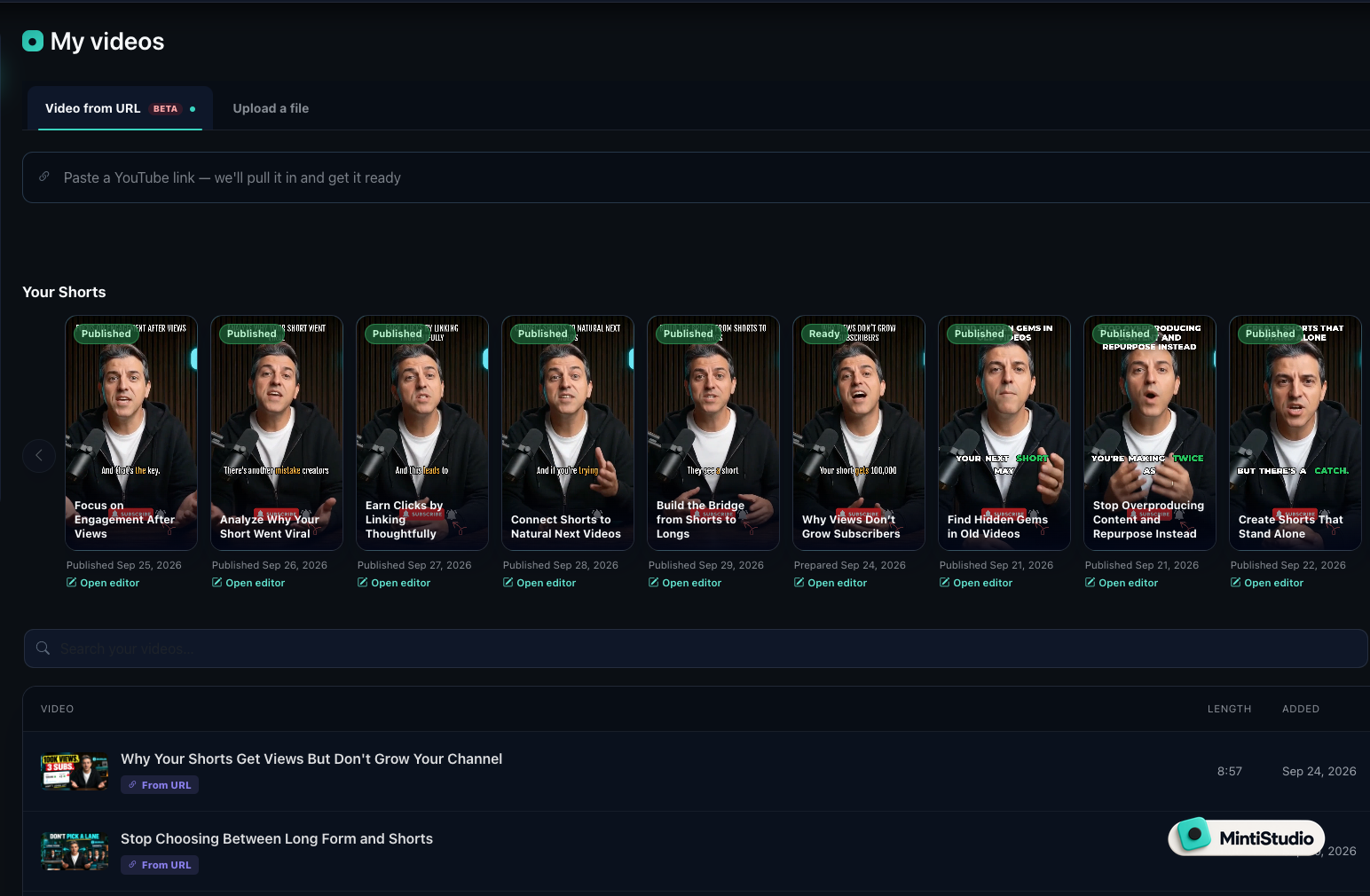 Screenshot from MintiStudio
Related guides
- Done-for-You vs DIY Video Clipping: Which Fits Your Week?
- The Weekly Shorts Workflow for Busy Creators
- How to Turn YouTube Videos into Shorts
Final take
If you want a familiar self-serve clipping platform, OpusClip is still a capable baseline.
If you want clipping volume with broad account coverage, Klap is a practical option.
If you want a hands-on editor with a wider feature surface, Vizard is a strong fit.
If you want the long-video-to-Shorts workflow handled for you, MintiStudio Autopilot is the clear choice for busy solo experts who already have recordings and do not want another tool to master.
Start free with MintiStudio and see what it feels like when the clipping workflow is handled end to end.
More from the blog
Before Your Lesson Goes Public, Check the Path to Your Offer
A practical publishing checklist for educators and consultants who want their long lessons and Shorts to support an offer clearly, accurately, and responsibly. Learn what to check before publishing so your title, captions, links, disclosures, and end screens all point in the same direction.

Will Your Lesson Still Make Sense on a Phone Screen?
When you crop a teaching video for Shorts, the goal is not just to fit the frame. The goal is to keep the lesson readable, understandable, and complete on a small screen. This guide gives educators, coaches, and interview podcasters a practical checklist for vertical cropping, with a simple workflow for reviewing text, references, and speaker changes before publishing.