Done-for-You vs DIY Video Clipping: Which Fits Your Week?
Compare self-serve and done-for-you video clipping by the work you keep, the control you need, and the time you can realistically give it. Includes MintiStudio’s DIY options and $20/month Autopilot service, plus a practical review checklist.
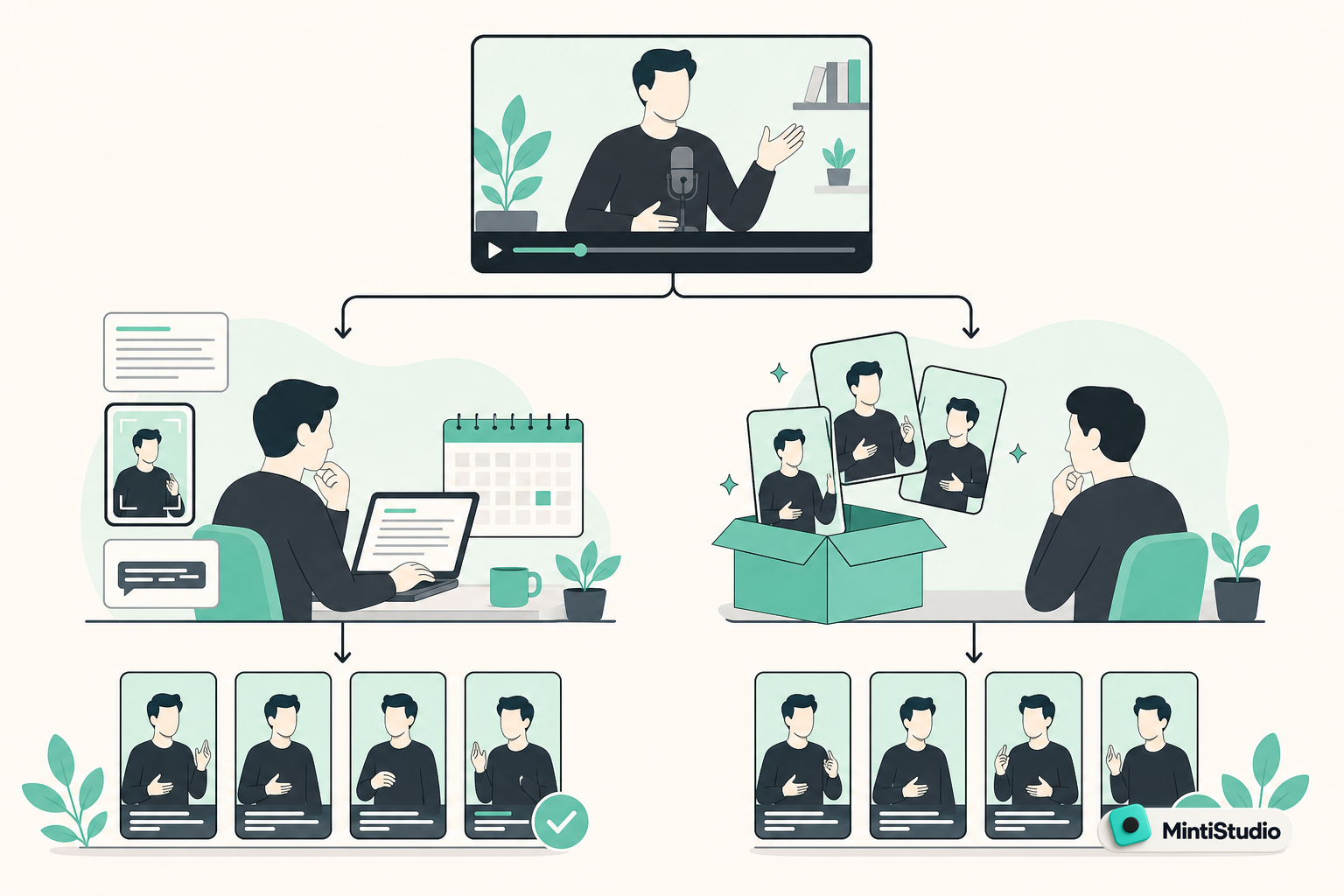
The best clipping workflow is the one that gets your expertise published without taking over your week.
You have the recordings. Who should do the clipping?
Your webinar is published. Your latest podcast episode is finished. Somewhere in those recordings are useful explanations that could become Shorts.
But finding them, preparing them, and getting them onto your channel is another job.
That is the buying decision behind done for you video clipping: do you want software that helps you do the work, or do you want the work handled for you?
For a solo educator, coach, consultant, or podcaster, neither answer is automatically better. DIY makes sense when you want hands-on production control and have time to use it. Delegation makes sense when your recordings keep accumulating because client work and teaching come first.
The useful comparison is not just subscription price. It is what remains on your calendar after you subscribe.
DIY and done-for-you solve different problems
DIY clipping reduces the effort involved in producing a Short. You still operate the workflow.
Done-for-you clipping transfers production tasks to someone else. You retain the editorial judgment about what represents your expertise.
That distinction matters because a faster tool does not necessarily solve a lack of production time.
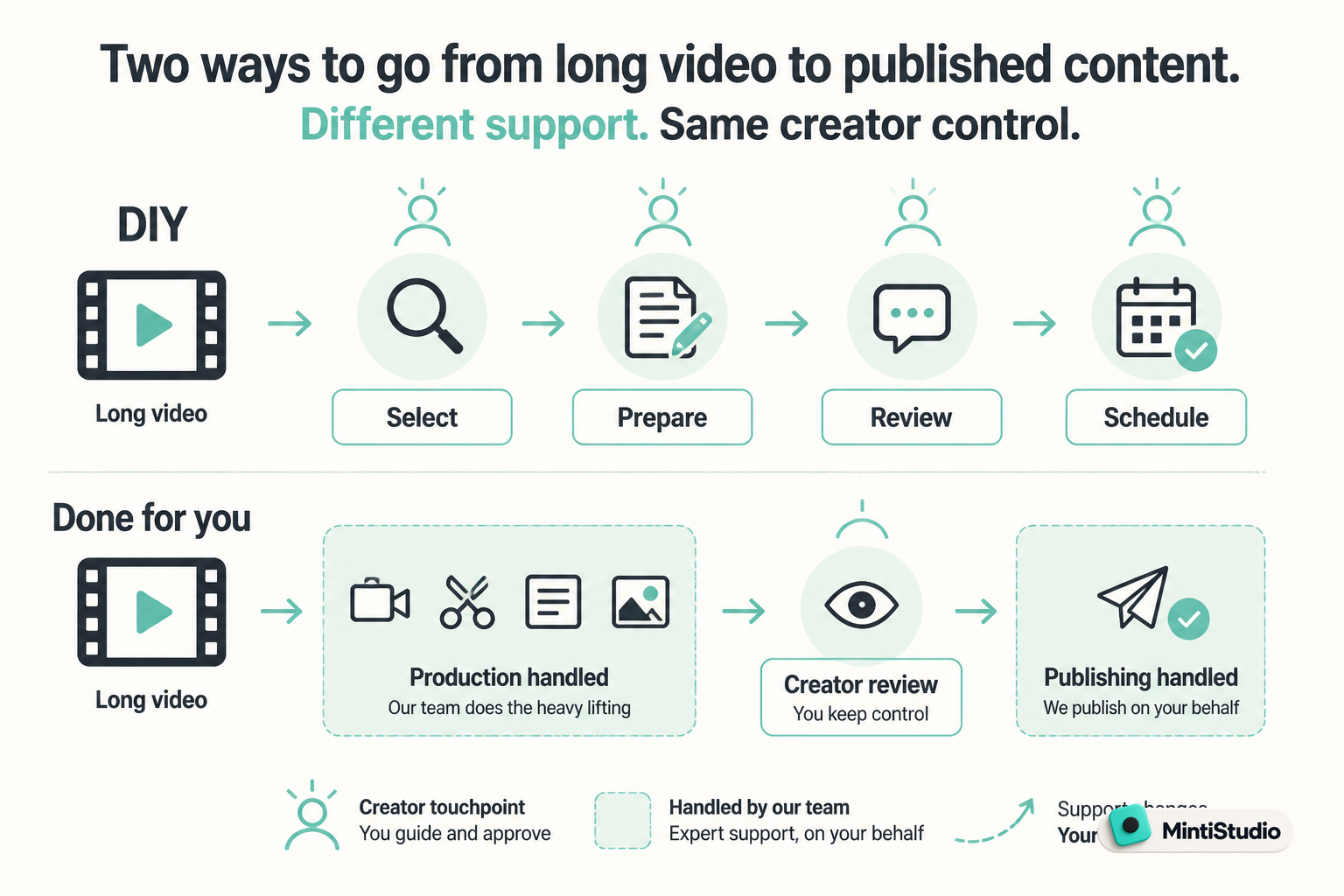
| Decision | DIY clipping | Done-for-you clipping |
|---|---|---|
| Finding moments | You review suggestions or select passages | Clip selection is handled for you |
| Preparing the video | You manage framing, captions, and titles | Preparation is handled for you |
| Publishing | You organize the schedule and publishing | Scheduling and publishing are handled for you |
| Your main task | Produce and review the clips | Review the prepared clips and flag changes |
| Best fit | You want to run production | You want production off your task list |
When comparing services, use these tasks as your checklist. Ask who owns each step, especially scheduling and review, rather than assuming every offer means the same thing.
When DIY video clipping is the better choice
You want to make the editing decisions yourself
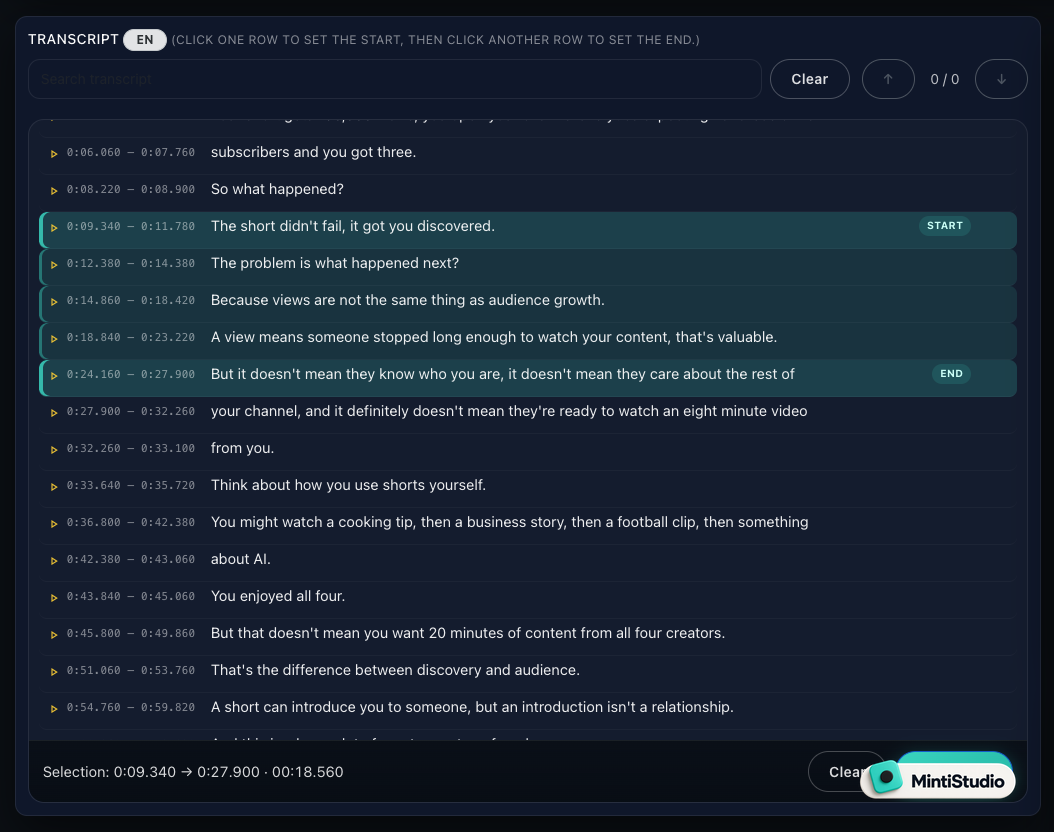
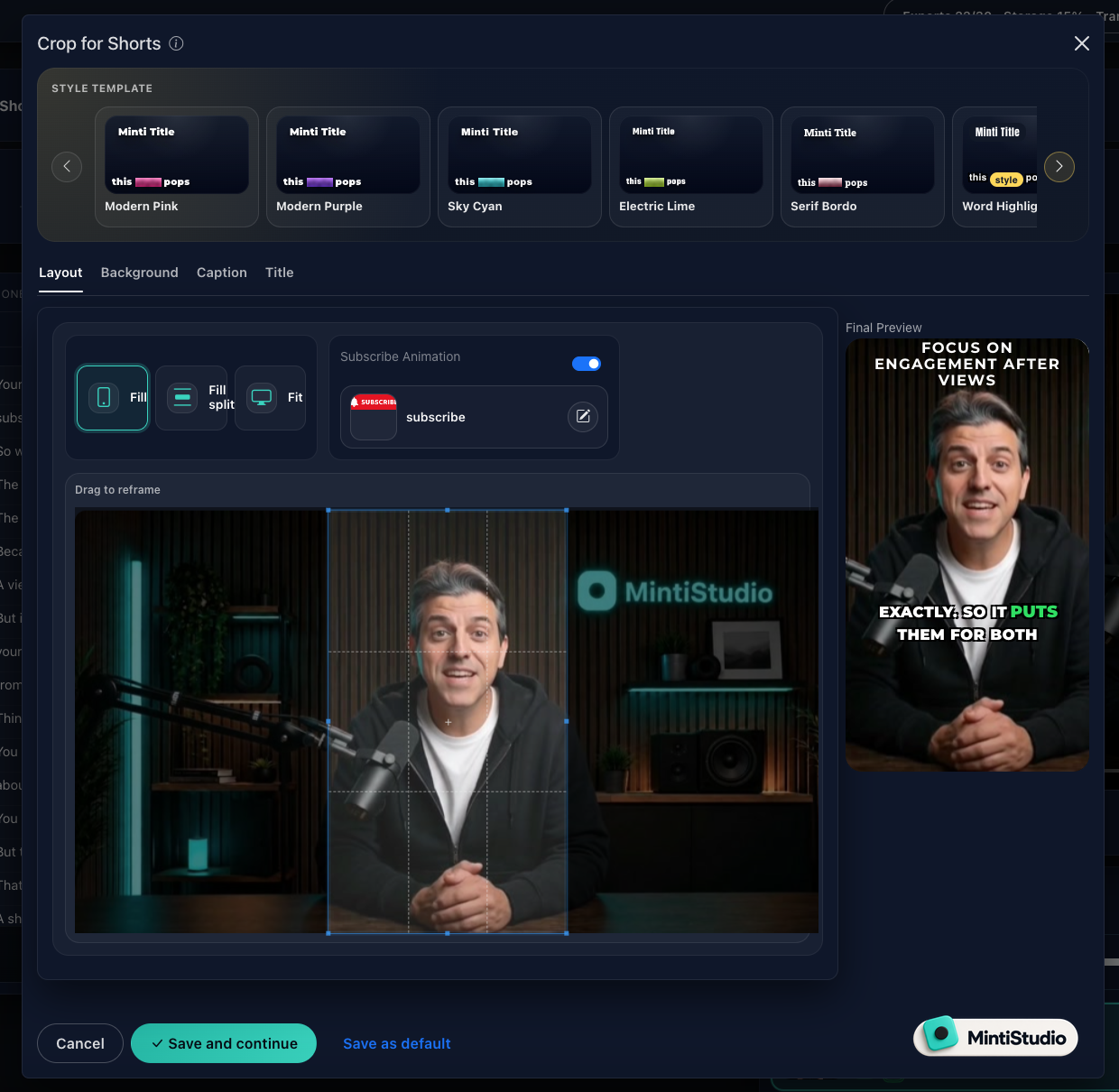
Some experts enjoy choosing the exact sentence where a clip begins, testing caption styles, and deciding how a horizontal recording should fit a vertical frame.
That work can be worthwhile. A teaching clip may need a particular example. A podcast answer may need one sentence from the question to make sense.
If making those choices is part of your creative process, DIY gives you a direct way to do it.
You have a repeatable production slot
DIY works best when clipping has an actual place in your week.
“Whenever I have a spare evening” is not much of a production plan. A recurring session for selecting, preparing, and scheduling clips is more concrete.
You do not need a large publishing target. Start with a manageable batch from one recording. The important question is whether you can complete the process without repeatedly borrowing time from paid work or your next long-form video.
You are still learning what makes a good clip
Hands-on selection can sharpen your judgment.
You notice which explanations stand alone, where you rely on earlier context, and which examples take too long to reach the point. Those lessons can improve your next recording, too.
For this stage, treat AI suggestions as candidates. Watch each candidate as if you had never seen the source video. Does it make sense, deliver something useful, and end cleanly?
When done-for-you video clipping is the better choice
Your recordings are ready, but your Shorts are not
If you consistently publish lessons, interviews, or webinars but rarely turn them into clips, your bottleneck is probably production capacity.
Another set of editing controls may not change that. The work still needs someone to choose moments, prepare the videos, and schedule them.
Delegation fits when you know what your channel is about and have source material, but cannot justify becoming its part-time clip editor.
The unfinished work is spread across several steps
Sometimes selecting clips is easy. It is everything afterward that stalls.
You have timestamps in a notebook, unfinished vertical edits, and titles waiting to be written. Each task is small, but each requires you to reopen the project and remember what comes next.
A done-for-you workflow is useful here because it moves a sequence of tasks off your list, rather than making one isolated task faster.
You want to spend your attention on substance
A consultant is well placed to judge whether a recommendation needs a qualification. An educator knows whether a clip misrepresents a concept. A podcaster knows whether an answer preserves a guest’s meaning.
Those are editorial decisions. They do not require you to perform every production step yourself.
Delegating production and retaining editorial control are compatible choices.
Compare the full cost, not just the subscription
A low-cost tool is good value when you use it to finish the work. A service is good value when it removes work you would otherwise do or leave unfinished.
Use a simple comparison:
Monthly cost = subscription price + the value of the production and review time you still spend.
For DIY, include finding moments, checking context, framing, captions, titles, and scheduling. For done-for-you, include setup, watching prepared clips, and communicating changes.
Do not assume every saved hour becomes billable income. The benefit might be protecting your recording schedule, reducing evening work, or keeping a useful publishing rhythm during a busy month.
Measure one real batch if possible. Record how much active time you spend and where the work stops. That gives you a better buying signal than a long feature list.
Where MintiStudio helps
MintiStudio turns long videos into YouTube Shorts and Instagram Reels. Facebook Page publishing is supported when a Facebook Page is connected.
It offers both self-serve clipping and a done-for-you Autopilot service, so the choice is about how much production you want to own.
DIY: use the tools and run the workflow
MintiStudio’s DIY self-serve options include $0 and $9 plans.
You can add a video by pasting a YouTube link or uploading a file. MintiStudio supports AI clip suggestions and transcript-based clip selection, giving you ways to find candidate moments and choose passages yourself.
Caption style templates and horizontal-to-vertical reframing support preparation. Scheduling, publishing, and a publishing calendar support the release process. Comment tracking and analytics help you review what happens afterward.
This route fits when you want to select and prepare your clips yourself, with software supporting the work.
Autopilot: have production handled for you
MintiStudio Autopilot is $20 per month, with a first month free, no card required, and cancellation anytime. The $20/month plan starts at 15 Shorts per month; larger packages include more.
You share your YouTube channel link. MintiStudio chooses clip-worthy moments from your long videos, prepares the Shorts with vertical reframing, captions, and titles, and handles scheduling and publishing.
You connect your own YouTube account, so the Shorts publish on your own channel.
For a busy solo expert, this is the central difference: Autopilot is not a tool you learn and run yourself. It handles the long-video-to-Shorts workflow while you keep creating the recordings and reviewing how your expertise is presented.
You retain visibility and control before publishing
Before anything is published, you can see every prepared Short and object to or request changes on any of them. Nothing goes out that you do not want.
Everything is visible on your My Videos page under “prepared by Minti.” You can watch, edit, or delete any Short there at any time.
That makes your role concrete: review the finished explanation, identify anything that needs changing, and keep the clips aligned with your teaching or business.
What should you check before a Short goes out?
Whether you produce a clip yourself or review a prepared one, use the same editorial standard.
Check these five things:
- Meaning: Does the excerpt preserve what you actually meant, including any essential qualification?
- Context: Can a new viewer understand the opening without hearing the previous question or example?
- Accuracy: Are captions, names, numbers, and specialist terms correct?
- Presentation: Is the speaker or teaching material visible, and are captions readable?
- Promise: Does the title describe what the clip delivers without exaggerating the claim?
For coaching sessions or client-related recordings, also check that you have permission to publish and that private information stays private.
Make feedback specific. Instead of “this feels wrong,” say “keep the sentence explaining who this advice applies to” or “the title describes a guarantee, but the clip describes an option.”
Specific feedback identifies the change that matters without turning review into a complete re-edit.
A simple workflow for choosing your route
1. Pick one useful source recording
Choose a recording that reflects your current expertise and the audience you want to reach. Avoid starting with an outdated offer or a conversation that needs extensive context.
2. Name your actual bottleneck
Is it choosing moments, preparing vertical videos, writing titles, or getting everything scheduled?
If you enjoy the work but need better support, test DIY. If the entire sequence competes with higher-priority work, test delegation.
3. Set a review standard
Use the five checks above. Judge clips by whether they represent you clearly, not by whether you would have made every cosmetic choice the same way.
4. Evaluate a completed publishing cycle
Track your active production time, review time, requested changes, and whether the planned clips actually went out.
Then look beyond views. Did the clips address questions your students or clients care about? Did comments reveal useful follow-up topics?
Choose the workflow you can sustain, not the one you imagine using during an unusually quiet week.
Related guides
- The Weekly Shorts Workflow for Busy Creators
- AI Can Suggest Your Clips. You Should Still Decide Which Ones Go Out.
- Why Your Shorts Get Views But Don’t Grow Your Channel
Choose what you want to keep doing
Keep DIY if producing the clips is work you want and can reliably make time for.
Choose done-for-you if your recordings already exist and production is the part that keeps slipping. Keep your attention on accuracy, context, and whether each Short represents your expertise.
Your next step is simple: pick one recording and decide whether you want to produce its clips or review them.
Start free with MintiStudio. If you want production handled, try Autopilot’s first month free, with no card required.
More from the blog
YouTube Shorts for Consultants: A Practical Workflow for Public Proof Without Sharing Client Confidentials
Consultants often have strong expertise locked inside private calls, workshops, and explainers. This guide shows how to turn those long recordings into buyer-relevant Shorts that build public proof, while keeping confidential details out of the workflow.
Turn Prospect Objections into Your Next Teaching Video
Use the questions prospects ask on sales calls to plan teaching videos that answer real objections, show your thinking, and create standalone moments that can become Shorts. This guide gives coaches and consultants a simple way to turn one conversation topic into a useful long video and a set of clip-ready lessons.