Best AI Video Clipping Tools in 2026: 6 Tools Compared
Compare the best AI video clipping tools for turning long videos into Shorts in 2026. See strengths, limitations, free options, editing features, and which tool fits your workflow.

Long videos often contain several useful short-form moments. The slow part is finding them, choosing clean start and end points, reframing horizontal footage, correcting captions, and preparing each clip for publishing.
AI video clipping tools reduce that work, but they do not all solve the same problem. Some prioritize automatic clip discovery. Some give editors more control. Others combine recording, clipping, and publishing, while Minti Studio also offers a done-for-you path for creators who do not want to run every production step themselves.
This guide compares six relevant options for someone asking: I already create long videos. Which tool should I use to turn them into short clips?
The comparison is based on current product pages and official documentation reviewed on November 6, 2026. It is a feature and workflow comparison, not a claim that we hands-on tested every product. Features and plan availability can change, so confirm any must-have capability before committing your workflow.
The short answer
- OpusClip is the broad automation choice for creators who want AI discovery, scoring, editing, reframing, and scheduling in one established tool.
- Klap is a focused long-video-to-short workflow with clip ranking, active-speaker reframing, captions, and scheduling.
- Vizard fits content teams that want AI clipping, a browser editor, shared workflows, and a social calendar.
- Riverside is the most natural fit when recording podcasts or interviews and repurposing them should happen in the same workspace.
- Descript gives creators the most familiar text-based editing workflow when detailed control matters more than automatic posting.
- Minti Studio is the flexible choice when you want to start with a free DIY tool and retain the option to move to a done-for-you Autopilot workflow.
There is no honest universal winner. The best choice depends on where your current bottleneck sits.
Quick comparison of the best AI video clipping tools in 2026
| Tool | Best for | AI clip discovery | Caption editing | Vertical reframing | Publishing or scheduling | Free way to try | Workflow model |
|---|---|---|---|---|---|---|---|
| Minti Studio | Moving between DIY and done-for-you | Yes | Yes | Yes | Scheduling and publishing workflow | Free tool without registration | DIY or Autopilot |
| OpusClip | Broad clipping automation | Yes | Yes | Yes | Built-in scheduler | Free plan | Self-serve |
| Klap | A focused clip-to-calendar workflow | Yes | Yes | Yes | Built-in scheduling | Free trial | Self-serve |
| Vizard | Content teams and social calendars | Yes | Yes | Yes | Calendar and auto-scheduling | Free plan | Self-serve |
| Riverside | Recording and repurposing podcasts | Yes | Yes | Yes | Export and sharing workflow | Free plan | Self-serve |
| Descript | Text-based editing control | Yes | Yes | Yes | Direct YouTube export; Shorts require manual upload | Free plan | Self-serve |
The table deliberately avoids scores such as “9.4 out of 10.” Without the same source files, settings, and review criteria across every product, that kind of precision would be misleading.
1. OpusClip: best for broad AI clipping automation
OpusClip combines automatic clip discovery with virality scoring, animated captions, AI reframing, a browser editor, and social scheduling. Its current ClipAnything workflow is positioned for a wider range of footage than speech-only podcasts, including vlogs, gaming, sports, interviews, and explainers.
Strengths
- AI finds and ranks moments from long footage.
- Captions and multiple aspect ratios are part of the same editing flow.
- The editor supports manual refinement after generation.
- Clips can move into OpusClip's social calendar without a separate export-and-upload step.
- A free plan provides a practical way to evaluate the workflow.
Limitations
OpusClip's breadth can be more than a creator needs if the only job is turning straightforward talking-head videos into a few Shorts. Virality scores help prioritize a review queue, but they are still predictions rather than a guarantee that a clip will perform. You should review context, cuts, names, and captions before publishing.
Who should choose it
Choose OpusClip if you work with varied video formats and want discovery, editing, reframing, and scheduling inside one self-serve product.
2. Klap: best for a focused long-video-to-short workflow
Klap turns an uploaded video or supported link into ranked vertical clips. Its documented workflow includes transcript-based moment selection, a virality score, active-speaker reframing, editable animated captions, browser editing, and a publishing calendar.
Strengths
- The workflow stays focused on turning long videos into ready-to-post clips.
- Clip scores include an explanation, which can make the first review pass faster.
- Reframing supports active speakers and layouts for multi-person or screen-based footage.
- Captions, cuts, framing, branding, and scheduling live in the same product.
- A free trial is available for evaluating a source video.
Limitations
Klap is still a self-serve workflow: someone needs to review the selected moments, correct anything that is wrong, and decide what should actually be published. As with any score, a high ranking does not replace editorial judgment about your audience or message.
Who should choose it
Choose Klap if you want a direct path from a long, speech-led video to a ranked batch of captioned clips and a social calendar.
3. Vizard: best for content teams using a social calendar
Vizard combines AI-generated clips with a full browser editor, automatic reframing, captions, workspace features, and social scheduling. Its documentation also describes an auto-schedule flow that can select generated clips and place them into a publishing plan.
Strengths
- AI clip discovery and editing are available in one workspace.
- The editor supports caption, layout, and branding adjustments.
- A calendar supports scheduling to connected social accounts.
- Shared workspace and team features are available for collaborative production.
- A free plan includes AI-generated clips and editor access.
Limitations
The combination of credits, workspaces, editing, and publishing options means teams should check the current plan details against their volume and collaboration needs. Auto-scheduling can reduce manual posting, but teams should still define an approval step so generated clips do not bypass brand or accuracy review.
Who should choose it
Choose Vizard if several people need to move clips through editing, review, and a shared publishing calendar.
4. Riverside: best for podcast recording and repurposing
Riverside Magic Clips sits inside a broader recording and editing platform. It identifies highlights from a recording, creates clips, and lets the user adjust duration, speaker focus, aspect ratio, layout, branding, and captions.
Strengths
- Recording, transcription, editing, and clipping can stay in one environment.
- Magic Clips finds highlights automatically.
- Text-based editing is useful for interviews and podcasts.
- Users can adjust layouts, ratios, speakers, captions, and branding.
- Riverside offers a free plan that includes Magic Clips.
Limitations
Riverside makes the most sense when its recording workflow is also valuable to you. If your long-form library already lives elsewhere and you only want a specialized clipping-and-scheduling tool, a clipping-first product may be a more direct fit. Its official workflow emphasizes export and sharing rather than a dedicated multi-platform short-form scheduling calendar.
Who should choose it
Choose Riverside if you record remote podcasts, interviews, or webinars and want repurposing to begin in the same project as the original recording.
5. Descript: best for text-based editing control
Descript treats a transcript as the editing surface. Its Create Clips workflow can identify highlights, create clips in different aspect ratios, apply captions and layouts, and leave every result editable in the main Descript project.
Strengths
- Video can be edited by changing text rather than working only on a timeline.
- AI can find highlights and create multiple social clips.
- Captions, layouts, aspect ratios, filler-word removal, and detailed edits remain adjustable.
- It works naturally for podcasts, webinars, interviews, and presentations.
- A free plan lets users try text-based editing and limited AI repurposing.
Limitations
Descript is an editor first, so it suits people willing to make editorial decisions. Its official YouTube export documentation states that direct YouTube Shorts publishing is not supported; Shorts need to be downloaded and uploaded manually. If a built-in multi-platform short-form calendar is essential, consider a scheduling-focused tool.
Who should choose it
Choose Descript if transcript-level control and broader audio/video editing matter more than a fully automated clip-to-social workflow.
6. Minti Studio: best for choosing between DIY and done-for-you
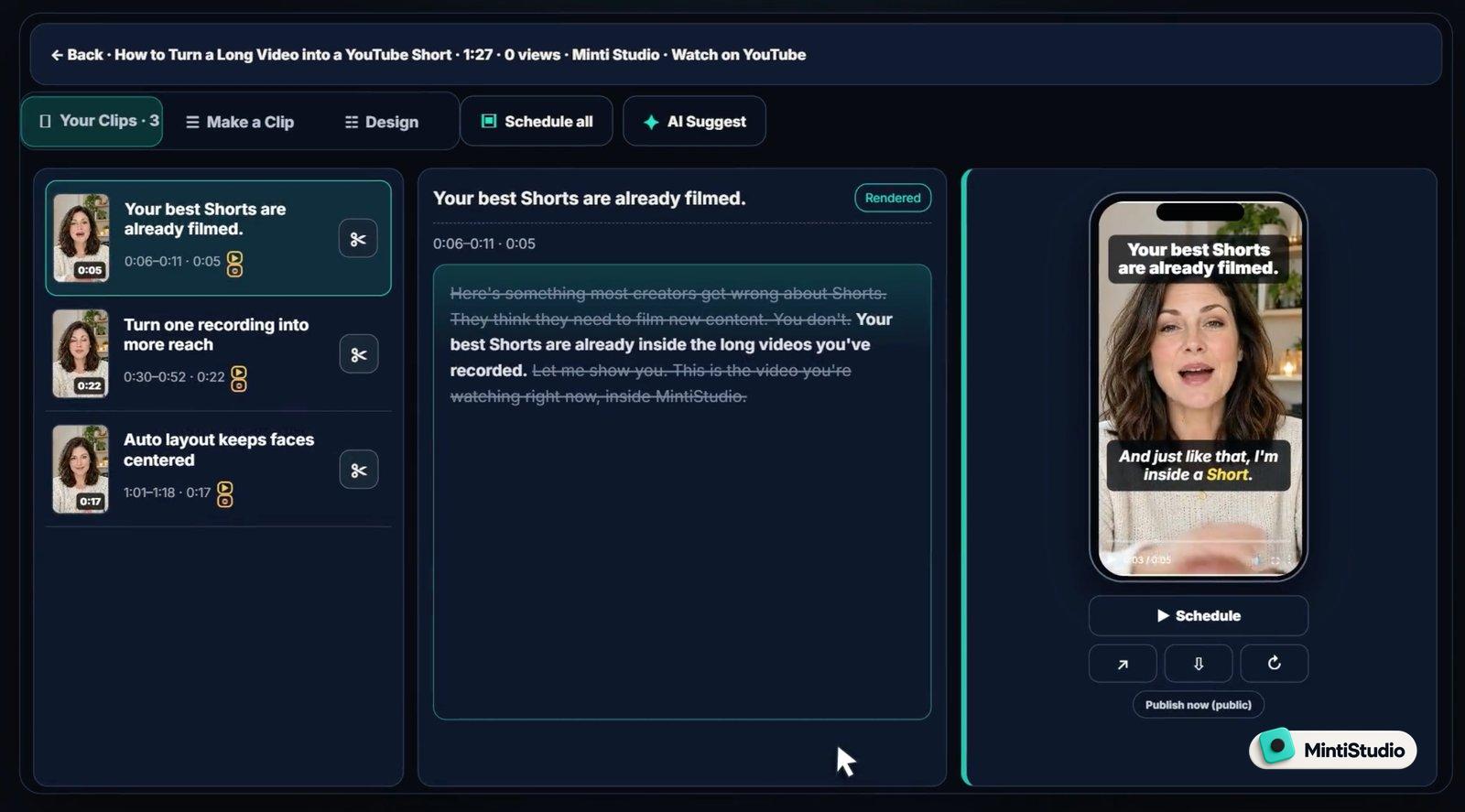 Screenshot from Minti Studio
Minti Studio is built around repurposing speech-led long-form videos. Its main difference is not a claim to have the longest feature list. It is the ability to use the same product in two different ways.
DIY workflow
With the free AI video clipping tool, you can paste a public YouTube URL and try the workflow without registration. Minti Studio identifies promising moments, prepares a captioned vertical Short, and lets you adjust captions and framing. A free account unlocks the broader download, scheduling, and publishing workflow.
Autopilot workflow
The done-for-you short form video editing service is for creators who already publish long videos but do not want to manage every clipping step. The user connects a YouTube channel; Minti Studio prepares clips, captions, vertical framing, and titles, then keeps the prepared Shorts accessible in the account for review before publishing.
Strengths
- A no-registration free tool makes the core workflow easy to evaluate.
- AI-assisted discovery, transcript-based selection, captions, and vertical framing support DIY editing.
- Scheduling and publishing are part of the account workflow.
- Autopilot offers a software-led, done-for-you alternative without pretending to be a traditional human editing agency.
- Prepared Autopilot Shorts remain reviewable before publishing.
Limitations
Minti Studio is most relevant to creators, educators, consultants, coaches, and podcasters with speech-led long-form content, especially existing YouTube libraries. If you need a broad production suite for gaming, sports footage, remote recording, or detailed multi-track audio work, OpusClip, Riverside, or Descript may fit better.
Who should choose it
Choose Minti Studio if you want to test AI clipping yourself now while keeping a clear path to a more hands-off workflow later.
Want to try AI clipping yourself? Paste a YouTube link into Minti Studio's free AI video clipping tool. No registration is required to create the first result.
How to choose an AI video clipping tool
Decide how much editing control you want
If you want transcript-level control over every cut, Descript is a strong starting point. If you prefer to review a batch of automatically selected clips, OpusClip, Klap, Vizard, Riverside, or Minti Studio can shorten the discovery step.
Check what your source library looks like
Creators with varied footage such as gaming, sports, or vlogs should examine OpusClip's broader visual clipping workflow. Podcasters who also need recording should consider Riverside. Creators with an existing library of speech-led YouTube videos may find Minti Studio's channel-based workflow more direct.
Separate clip discovery from clip quality
An AI can rank a moment and still miss context, pronounce a name incorrectly in captions, or choose a weak ending. Look for a workflow that makes review and correction easy. A “virality score” is a sorting aid, not a performance promise.
Decide whether publishing belongs in the same product
OpusClip, Klap, Vizard, and Minti Studio document built-in publishing or scheduling workflows. Riverside emphasizes export and sharing. Descript can publish some formats directly, but its official documentation says YouTube Shorts require manual upload.
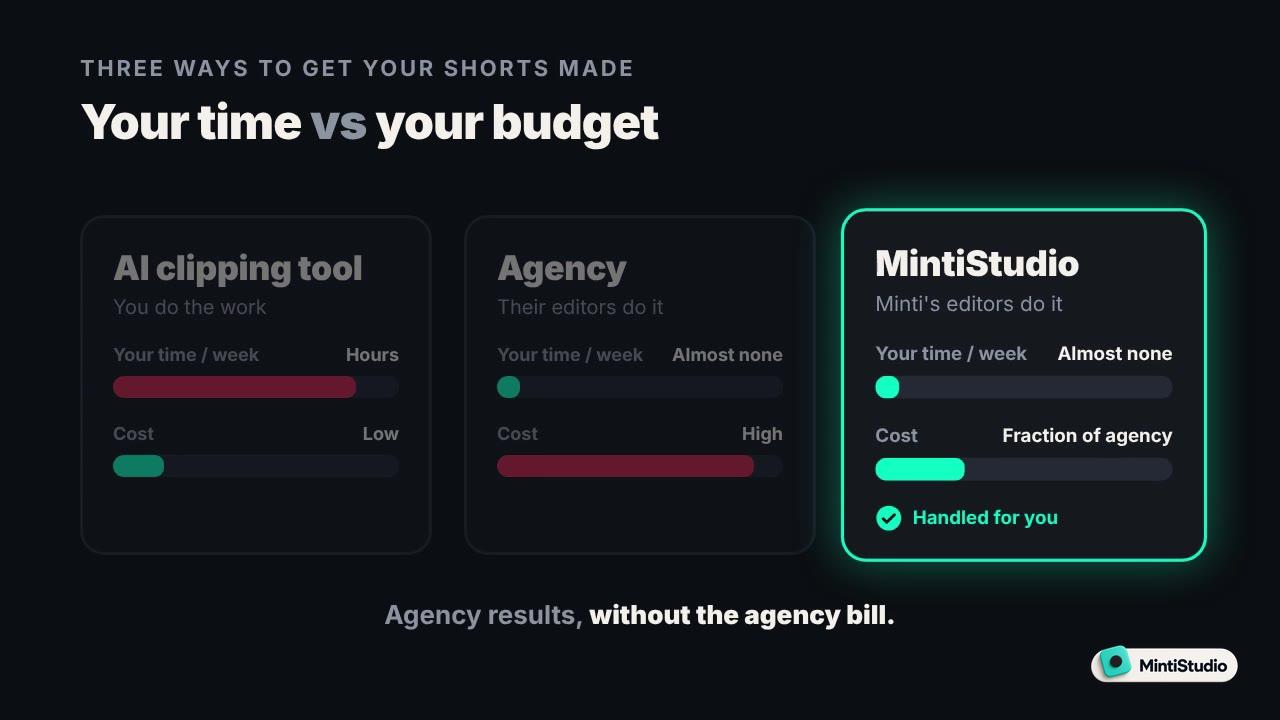
Choose between DIY and done-for-you
Most products in this comparison are self-serve tools. They reduce editing work, but you still operate the workflow. Minti Studio Autopilot is the option here for users who want the production steps prepared for them while retaining review before publishing.
For a deeper workflow comparison, read Done-for-You vs DIY Video Clipping or see how to repurpose long videos into short clips.
Frequently asked questions
What is an AI video clipping tool?
An AI video clipping tool analyzes a longer video and helps turn selected moments into shorter clips. Depending on the product, it may also add captions, reframe horizontal footage for vertical viewing, score suggested moments, provide an editor, or schedule finished clips.
Can AI turn long videos into Shorts?
Yes. The tools compared here can identify or create short clips from longer footage and format them for vertical viewing. The output should still be reviewed for context, caption accuracy, framing, and clean start and end points.
What is the best AI tool for YouTube Shorts?
It depends on the workflow. OpusClip and Klap suit automated clip discovery, Vizard suits team and calendar workflows, Riverside suits podcast recording, Descript suits detailed text-based editing, and Minti Studio suits creators who want a choice between DIY and done-for-you production.
Are AI clipping tools free?
Every product in this comparison offers either a free plan, free trial, or free tool. The included features and limits differ and can change, so check the product's current plan page before relying on a specific export quality, processing allowance, or publishing feature.
Can AI find the best moments in a video?
AI can rank moments using signals such as topic, clarity, hooks, speaker activity, and whether a section works on its own. “Best” remains subjective. The creator still knows which claims are accurate, which story fits the audience, and which moment supports the wider content strategy.
Do AI video clipping tools add captions automatically?
Yes. All six products in this comparison document automatic caption or transcription workflows. Caption text should be checked, especially for names, technical terms, accents, and noisy recordings.
A practical next step
Pick one recent long video and judge tools on the same real source. Compare the moments selected, how quickly you can correct captions and framing, and how much work remains before publishing. That test is more useful than choosing from the longest feature list.
If you want the Shorts prepared for you instead, review Minti Studio's done-for-you short form video editing workflow.
Official product sources
More from the blog

How Busy Doctors Can Grow a YouTube Channel in One Hour a Week
A practical weekly workflow for doctors who want a steady YouTube channel without turning content into a second job.

YouTube Shorts for Doctors: The Complete Guide
A practical guide for doctors and clinicians who want to use YouTube Shorts for education without turning content into a second job. Learn how to choose safe, useful topics, keep the tone professional, build a simple workflow, and use Minti Studio when your real bottleneck is turning recorded expertise into publishable Shorts.