How Experts Can Package YouTube Lessons for Viewers on the TV Screen
A practical guide for educators, coaches, and consultants who want their lessons to stay clear on a TV screen. Learn how to make long videos easier to follow in the living room, how to use Shorts as entry points to deeper expertise, and where Minti Studio fits when the real bottleneck is turning recorded lessons into publishable clips.
TV viewing changes the job of packaging. Your lesson has to stay readable, audible, and easy to continue.
If your audience watches on a TV, you are not only designing for a smaller attention span. You are designing for a different viewing posture, a larger screen distance, and a more shared environment.
That changes how a lesson should be framed, how much text it should show, and how easily a viewer can move from one video to the next.
For educators, coaches, consultants, and podcasters, the opportunity is simple: make the main lesson easy to follow on TV, then use Shorts as clean entry points that guide viewers toward the deeper video.
What TV viewing changes
A phone viewer can squint, pause, and scroll away. A TV viewer often sits farther back, may be watching with other people, and may be less likely to interact with a crowded interface.
That means packaging matters in three places:
- the thumbnail has to be legible at a distance
- the opening has to make the topic obvious quickly
- the lesson has to stay understandable without tiny visual details doing all the work
If you teach with slides, screen shares, charts, or overlays, the question is not whether they look good on your editing timeline. The question is whether a viewer across the room can still follow the point.
A simple rule for TV-first clarity
Use one visual idea per moment.
If a slide is busy, the viewer spends energy decoding the layout instead of absorbing the lesson. If the spoken point is clear and the on-screen support is simple, the content feels easier to stay with.
Package the lesson for distance first
 Screenshot from Minti Studio
You do not need to rebuild every video for television. You do need to remove the friction that comes from small text, cramped layouts, and overstuffed screens.
Start with the parts that matter most.
Make the main point visible
If the video teaches one framework, one process, or one decision, say that early. The viewer should know what the episode is for within the first moments.
Keep text large enough to read
On a TV, tiny labels disappear fast. Use fewer words per slide, fewer lines per graphic, and fewer nested bullet points.
Leave time for the eye
If a chart, diagram, or checklist is on screen, hold it long enough for a living-room viewer to process it. Fast cuts can work, but they should not force the viewer to replay every section.
Keep audio clean
On a TV, bad audio is harder to ignore than on a phone. If your lesson depends on spoken explanation, make sure the voice carries the idea without forcing the viewer to strain.
Shorts as the entry point
 Screenshot from Minti Studio
Shorts are useful when they introduce one useful idea and point people to the full lesson.
That makes them especially helpful for expertise creators who want viewers to discover the channel before they know the name.
A strong Short for TV-oriented content does not try to compress the whole lesson. It does one of these jobs:
- names the problem the full video solves
- shows the turning point in the lesson
- gives one practical takeaway that creates interest
- previews the structure of a longer explanation
The goal is not to replace the full video. The goal is to make the next click feel obvious.
Where Minti Studio helps
Minti Studio helps when your main bottleneck is turning recorded lessons into Shorts that can support the longer video.
You can paste a YouTube link or upload a file, then use AI clip suggestions and transcript-based selection to find moments that already carry your point. That is useful when you have a long lesson and need the strongest cut without hunting through the entire recording by hand.
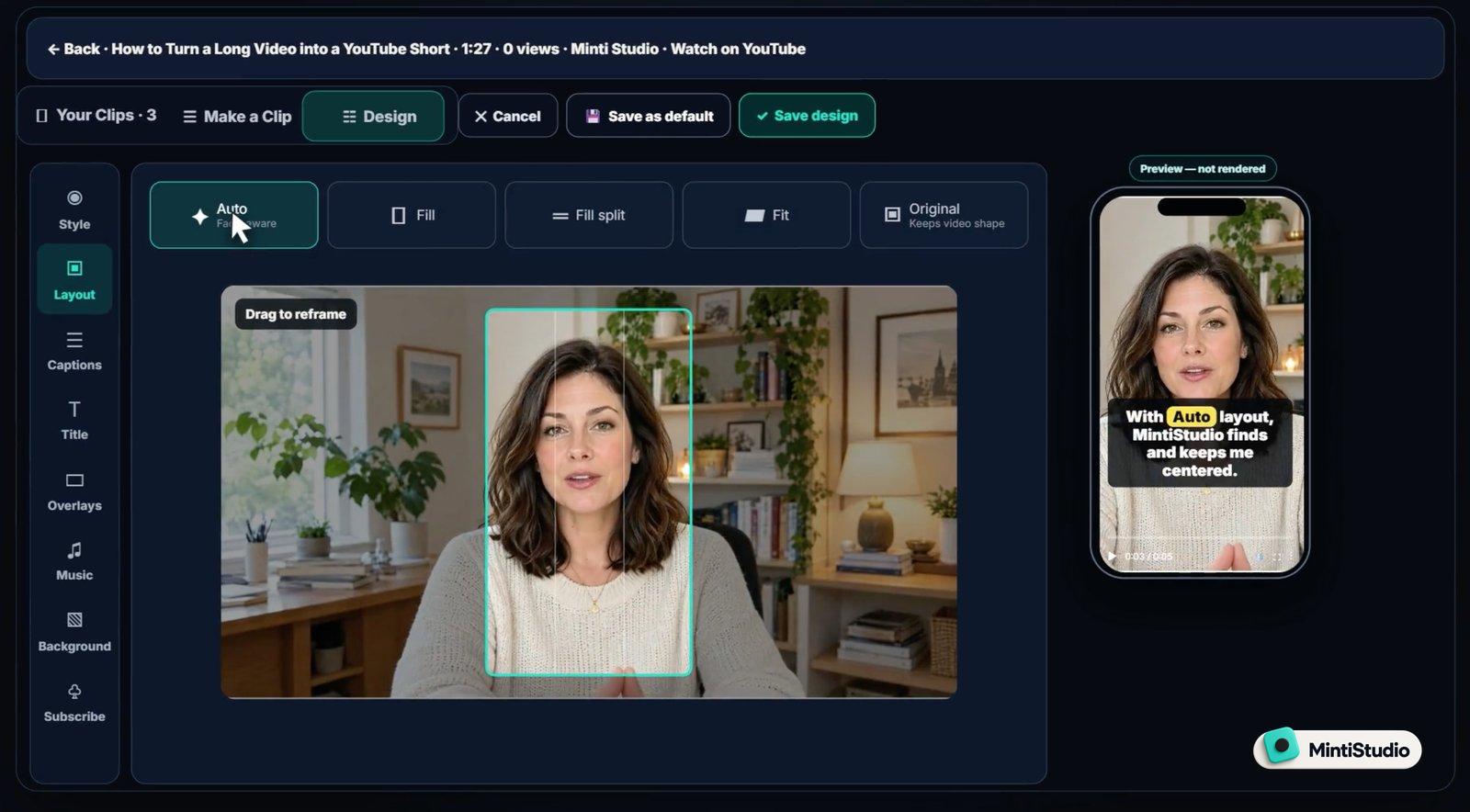
If your lesson was recorded horizontally, Minti Studio can reframe it to vertical so the clip works as a Short on mobile while still serving as a discovery path from TV viewers who later check the full episode.
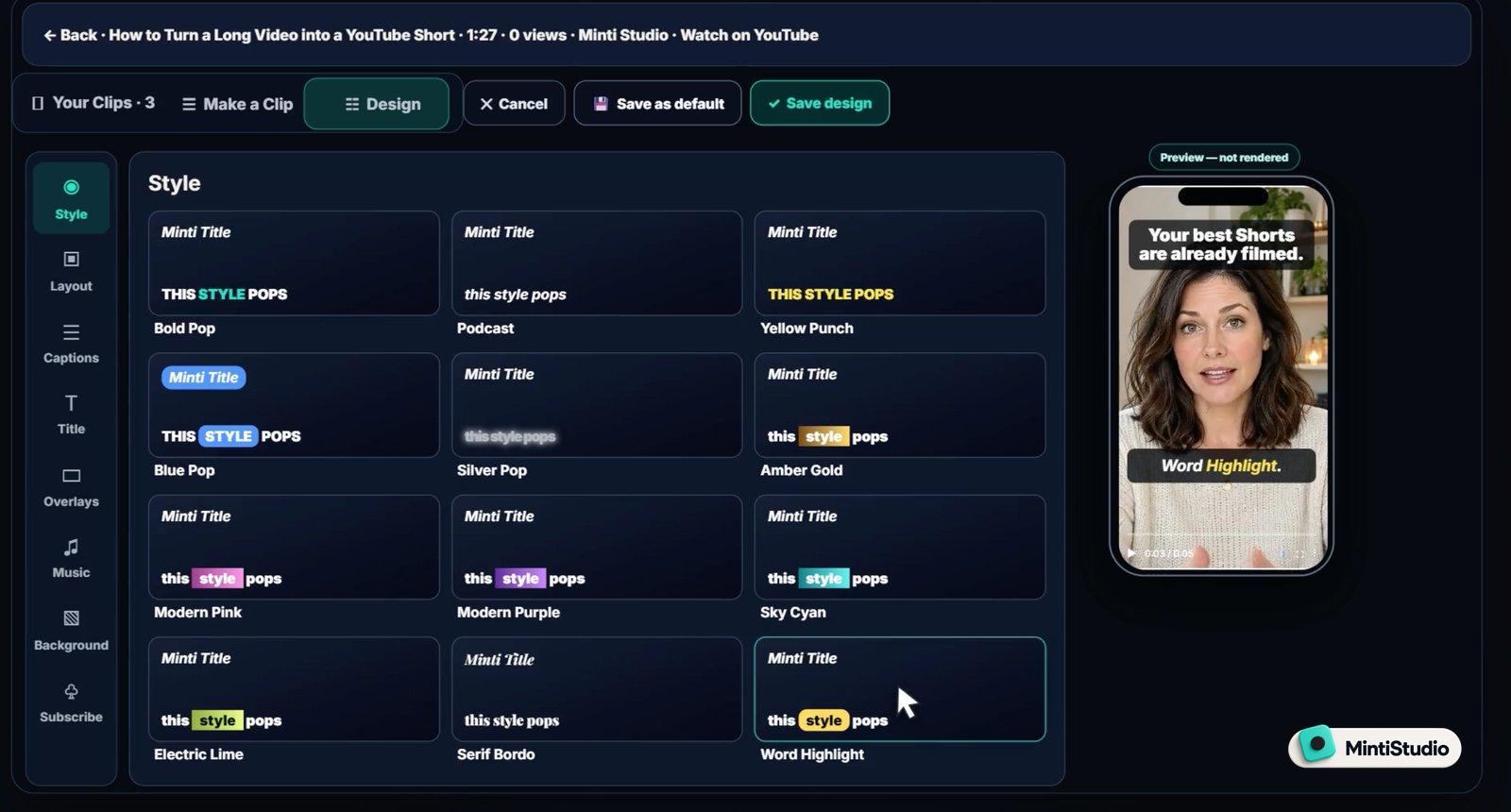
When you want the clip ready for publishing, caption style templates help you present the lesson clearly, and scheduling tools help you place it in a consistent release flow.
Autopilot fits when you want the done-for-you workflow handled from your YouTube channel link. Minti Studio prepares the Shorts, including the clip selection, vertical reframing, captions, titles, and scheduling prep, and you review each prepared Short before anything goes out.
That is a strong fit for busy solo experts who already have recordings and do not want to run a clipping workflow themselves.
What makes a lesson easy to continue watching
A TV viewer often decides whether to stay with a video based on how clearly the opening explains the lesson. The packaging should support that decision.
Give the viewer a clear path
When a lesson ends, the next step should not feel vague. Use the platform’s built-in next-step tools, spoken cues, and related videos that continue the same topic.
Group related videos together
If you have a sequence of lessons, keep them clearly organized in the way the platform supports. A viewer who watches on TV may prefer to keep moving through a topic instead of searching for the next relevant episode.
Keep the promise honest
A thumbnail and title should match the actual lesson. Overpromising creates a mismatch that becomes more obvious on a big screen, where the viewer has more time to notice whether the episode delivered what it said it would.
A practical workflow for packaging lessons
You do not need a complicated production system. You need a repeatable one.
Step one: choose the lesson angle
Start with one question the video answers. That keeps the whole package aligned.
Step two: build the long video around that answer
Use a structure that makes sense even if someone joins partway through. A clear intro, a useful middle, and a clean close all help.
Step three: cut one or two Shorts from the same recording
Use a Short to highlight the most useful moment or the clearest takeaway. If the lesson is strong, one recording can support both long-form viewing and short-form discovery.
Step four: check the clip on a small screen and a big one
A Short should still read cleanly on a phone, and the full lesson should still feel coherent on TV. Both views matter.
Step five: publish on a steady rhythm
A predictable release pattern helps viewers know what to expect. It also makes it easier to turn one recording into a sequence of related touchpoints instead of a one-off upload.
What to verify before you rely on platform claims
This topic often mixes creator commentary with platform changes, so it is worth checking current official documentation before you build a workflow around a feature or eligibility claim.
You should verify:
- YouTube Help guidance on the specific features you plan to use for viewer navigation
- YouTube Studio documentation for how viewing context is reported
- YouTube Help or official product pages for any feature-availability or eligibility claim you plan to rely on
If your plan depends on a specific feature, check the source directly before you build a process around it.
How Shorts support the larger teaching library
Shorts work best when they act like a doorway, not a detour.
For expertise creators, the strongest use case is simple: turn one useful lesson into a short clip that introduces the idea, then send viewers to the fuller explanation.
That matters even more when your audience watches across devices. A viewer may discover you on mobile, then later watch the deeper lesson on TV. If the Short and the long video say the same thing clearly, the transition feels natural.
Common packaging mistakes
A few mistakes show up again and again.
Too much on screen
If every frame carries a title, a subtitle, a lower-third, and a dense visual, the viewer works too hard.
Too little context
If the Short sounds interesting but does not explain why the idea matters, it becomes easy to skip.
Too much format, not enough substance
A vertical crop and captions are useful. They are not the lesson itself.
No path forward
If a clip points nowhere, it may earn attention but not deepen the audience relationship.
Related guides
- Help New Viewers Follow Your Expertise One Lesson at a Time
- Can Your Shorts Stay Original When You Repurpose Your Own Long Videos?
- Done-for-You vs DIY Video Clipping: Which Fits Your Week?
The practical next step
If your lessons need to work on TV and your Shorts need to bring viewers into the full episode, focus on clarity first and workflow second.
When the bottleneck is production time, Minti Studio can turn your long videos into Shorts while you keep your attention on the lesson itself.
Start free with Minti Studio and package your next lesson for the viewers who watch from the couch.
More from the blog
How Busy Doctors Can Grow a YouTube Channel in One Hour a Week
A practical weekly workflow for doctors who want a steady YouTube channel without turning content into a second job.
YouTube Shorts for Doctors: The Complete Guide
A practical guide for doctors and clinicians who want to use YouTube Shorts for education without turning content into a second job. Learn how to choose safe, useful topics, keep the tone professional, build a simple workflow, and use Minti Studio when your real bottleneck is turning recorded expertise into publishable Shorts.