How to Test the Opening of Your Expertise Videos Before Reworking Your Whole Channel
A practical guide for educators, coaches, consultants, and podcasters who want to test video openings before changing everything else. Learn what to test, how to read the results, what YouTube’s current tools appear to support, and where Minti Studio helps when you need a steady stream of Shorts to experiment with.
Test the opening first. Don’t rebuild the whole channel on a hunch.
If a long lesson or Short is underperforming, the fastest fix is not always a new title, a new thumbnail, or a full re-edit.
Often the problem sits in the opening. The first moments decide whether viewers keep watching long enough to get value from the rest of the video.
For solo experts, that matters because your videos are not random clips. They are part of a teaching business. You want viewers to understand the point quickly, trust the structure, and move toward the next video or the offer you actually want them to see.
Creators can use YouTube video testing to compare meaningful openings rather than guessing at small changes.
What to test first
Start with the part that changes the viewer’s decision fastest.
That is usually the opening, not the whole video.
Test the hook, not the decoration
A hook is the first idea your video promises. It can be a question, a belief shift, a quick outcome, or a direct problem statement.
If the hook is weak, the viewer has no reason to stay.
If the hook is clear, the rest of the lesson gets a fair chance.
Test the structure of the first minute
For expertise videos, the opening often does too much at once. It may greet the audience, explain the topic, name the agenda, and deliver context before the real point arrives.
That is a lot of work for a viewer who has not yet decided to stay.
Try a version that gets to the useful idea sooner.
Test the call to action after the lesson begins
Some creators ask for too much too early. Others wait so long that the viewer never hears the next step.
Test where the invitation feels natural after the viewer has received value.
Test one promise at a time
If you change the hook, thumbnail, title, and the first thirty seconds all at once, you will not know which change mattered.
Keep the experiment focused.
What YouTube appears to be emphasizing
YouTube’s recent product discussions point toward testing meaningful variations, especially in the opening and story approach, rather than over-focusing on tiny cosmetic changes.
The practical lesson is simple: a strong opening is a hypothesis you can test.
Current YouTube Help and announcement pages do not clearly confirm every detail creators are discussing in product videos. At the time of writing, the native experiment tools, thumbnail testing eligibility, test duration, and Ask Studio functionality are not all confirmed in the official sources I could verify for this article.
Relevant official pages to check:
- YouTube Help: A/B testing thumbnails and titles
- YouTube Help: YouTube Studio experiments and testing
- YouTube Help: Ask Studio
- YouTube Blog and announcements
What appears confirmed from official sources is the general direction: YouTube Studio offers testing and experimentation features for some creators and formats, but the exact availability and workflow can vary. If the current Help pages for your account do not show the feature, treat it as unconfirmed for your channel rather than assumed.
A simple way to choose what belongs in the test
 Screenshot from Minti Studio
You do not need a complicated framework.
You need one question.
Ask one useful question
Use a question like this:
- Does a direct problem statement keep more viewers than a story-based opening?
- Does a faster payoff keep more viewers than a slower setup?
- Does a clear “here’s what you’ll learn” opening outperform a conversational intro?
The point is to compare two meaningful starts, not two random edits.
Keep the rest of the video stable
If the body of the video keeps changing, you will not know whether the opening helped.
Hold the topic, editing style, and core lesson steady while you test the first section.
Give each version a fair chance
A test only helps if both versions get enough room to show a pattern.
You do not need to over-interpret the first few hours of performance.
Let the result breathe long enough to be useful, then make the next decision.
How to judge the result without overreacting
A good test gives you a clearer decision, not a perfect one.
Look at the opening through a practical lens.
Watch retention around the first moments
If viewers leave before the lesson starts, the opening is the likely bottleneck.
Look for clearer audience understanding
Sometimes the better version does not produce a dramatic spike, but it reduces confusion. That still matters if your goal is to get the right people to stay.
Compare behavior across similar videos
One test on one video is a clue.
A repeated pattern across several uploads is more useful.
Keep the business goal in view
Your goal is not to win a micro-optimization contest.
Your goal is to make it easier for the right viewer to stay with your teaching long enough to trust you.
Where Minti Studio helps
Minti Studio helps when the real bottleneck is not the test itself but the steady supply of clips you need to test.
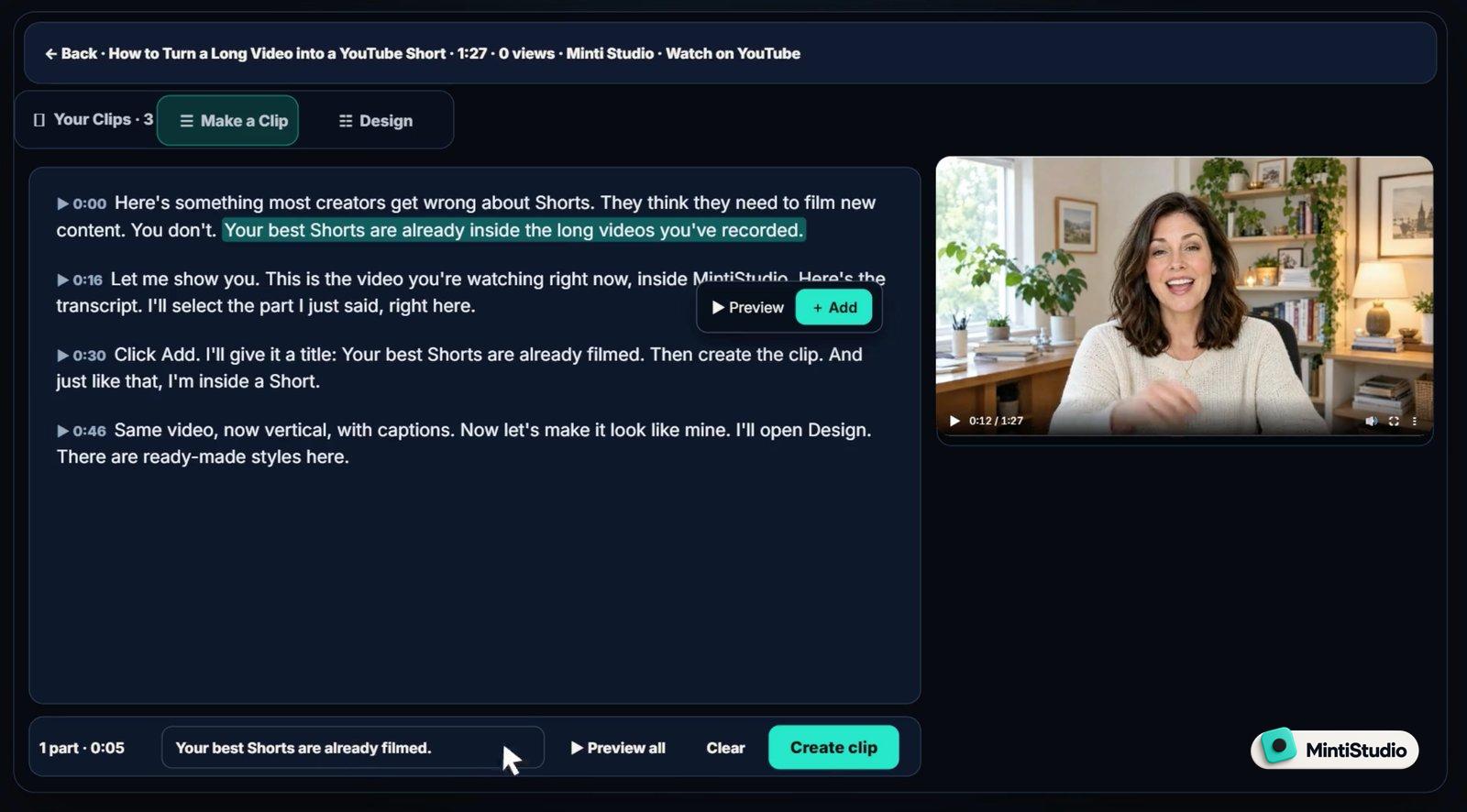
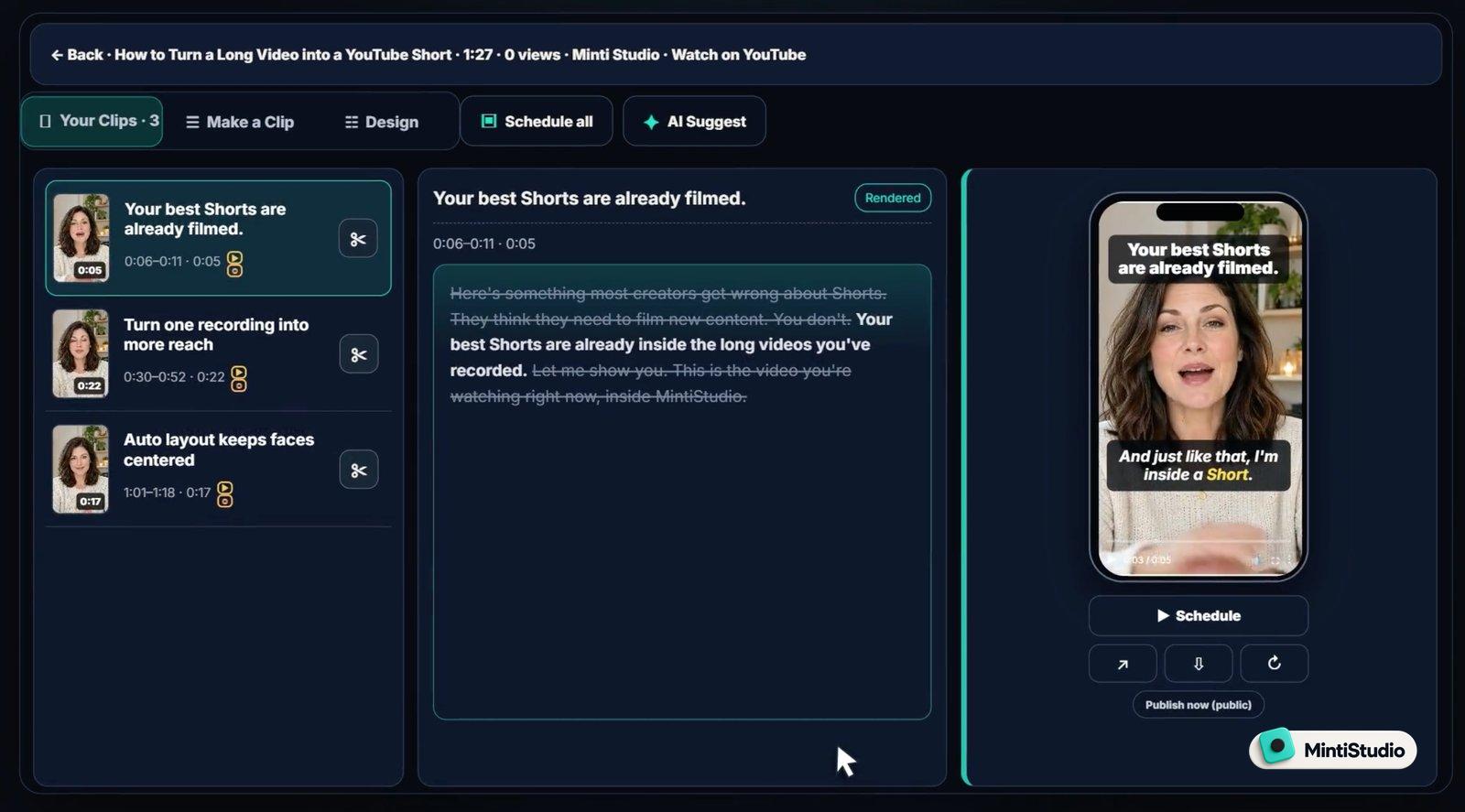
You can paste a YouTube link or upload a file, then use AI clip suggestions and transcript-based selection to pull out the strongest moments from your long videos. That gives you more candidate openings without starting from scratch each time.
If your source video is horizontal, Minti Studio can reframe it to vertical so your Short is ready for mobile viewing. That matters when you want to test which opening works best in the format people actually watch.
If you want more structure, the publishing calendar and scheduling tools help you space out versions instead of dumping everything at once.
If you prefer the done-for-you path, Autopilot fits when you want Minti Studio to handle the clipping workflow from your YouTube channel link. Minti Studio prepares the Shorts, including clip selection, captions, titles, reframing, and scheduling prep, while you review every prepared Short before anything goes out.
That is a practical fit for busy solo experts who already have recordings and need more testable Shorts without adding another editing job to the week.
A workflow you can repeat
 Screenshot from Minti Studio
You do not need a big experiment.
You need a repeatable one.
Step one: pick one lesson with room to improve
Choose a video that has a clear audience and a clear topic. The weaker the opening, the easier it is to learn from the test.
Step two: create two different openings
Make one version that gets to the point quickly and one that uses a different angle, such as a story or a stronger problem statement.
Step three: publish them under the same conditions
Keep the surrounding factors as stable as possible so the opening is the variable you are actually studying.
If YouTube Studio’s native experiment tools are available to your channel, use them for a cleaner comparison because the platform can control more of the setup. If they are not available, compare separate uploads only as a rough signal. Separate uploads can differ in audience mix, timing, recommendation context, and distribution, so they are not the same as a controlled A/B test.
Step four: review the early behavior
Check whether people keep watching long enough to reach the lesson. That tells you more than personal preference alone.
Step five: apply the winner to the next video
A useful test should change the next upload, not just the one you already published.
Ask Studio and other YouTube tools: what to verify
You may hear about Ask Studio, thumbnail testing, video testing, or audience-aware suggestions in YouTube discussions.
Before you plan around any of them, verify the current details in official sources.
Use YouTube Studio Help and YouTube’s official announcements to confirm:
- availability
- eligibility
- how the test is set up
- whether results are predicted or final
- whether the feature works for your video type and channel
At the time of writing, the official sources I could verify do not fully confirm a universal seven-day decision window or the exact Ask Studio workflow described in creator discussions. Treat those details as unconfirmed unless the current Help pages for your account say otherwise.
If the feature is available to you, use it as a decision aid.
If it is not available, keep testing manually with controlled publishing.
What not to waste time on first
A lot of creators spend time on the least important changes.
Don’t start with a full channel redesign
If the opening is the issue, a new banner or a new color system will not fix it.
Don’t confuse preference with evidence
A thumbnail you like is not the same thing as a thumbnail that helps viewers stay.
Don’t test too many variables at once
If you change everything, you learn almost nothing.
Don’t ignore the offer path
For educators, coaches, consultants, and podcasters, the point of the video is usually not the view alone. It is the next step the view can lead to.
Use Shorts as part of the testing loop
Shorts are useful because they let you test openings more often.
A single long recording can produce multiple short tests, each with a different angle on the same idea.
That means you can learn faster without recording new material every time.
If one Short opens with a sharp problem statement and another opens with a surprising insight, you can see which framing gets the better response and then apply that pattern to the next long video.
That is a cleaner way to improve than guessing at the whole channel at once.
Related guides
- How Experts Can Package YouTube Lessons for Viewers on the TV Screen
- Can Your Shorts Stay Original When You Repurpose Your Own Long Videos?
- Done-for-You vs DIY Video Clipping: Which Fits Your Week?
The practical next step
Do not rework your whole channel because one opening feels off.
Test the opening, learn what changes behavior, and carry that lesson into the next upload.
If you want a steadier supply of Shorts to test, Minti Studio can turn your long videos into publishable clips while you stay focused on the teaching itself.
Start free with Minti Studio and turn your next long lesson into something you can actually test.
More from the blog
How Busy Doctors Can Grow a YouTube Channel in One Hour a Week
A practical weekly workflow for doctors who want a steady YouTube channel without turning content into a second job.
YouTube Shorts for Doctors: The Complete Guide
A practical guide for doctors and clinicians who want to use YouTube Shorts for education without turning content into a second job. Learn how to choose safe, useful topics, keep the tone professional, build a simple workflow, and use Minti Studio when your real bottleneck is turning recorded expertise into publishable Shorts.