How Educators Can Turn Long Videos into Shorts That Attract Students
Educators already record hours of clear teaching in lessons, courses, and webinars. Learn how to turn those long videos into focused, one-concept Shorts that bring new students to your channel and courses.
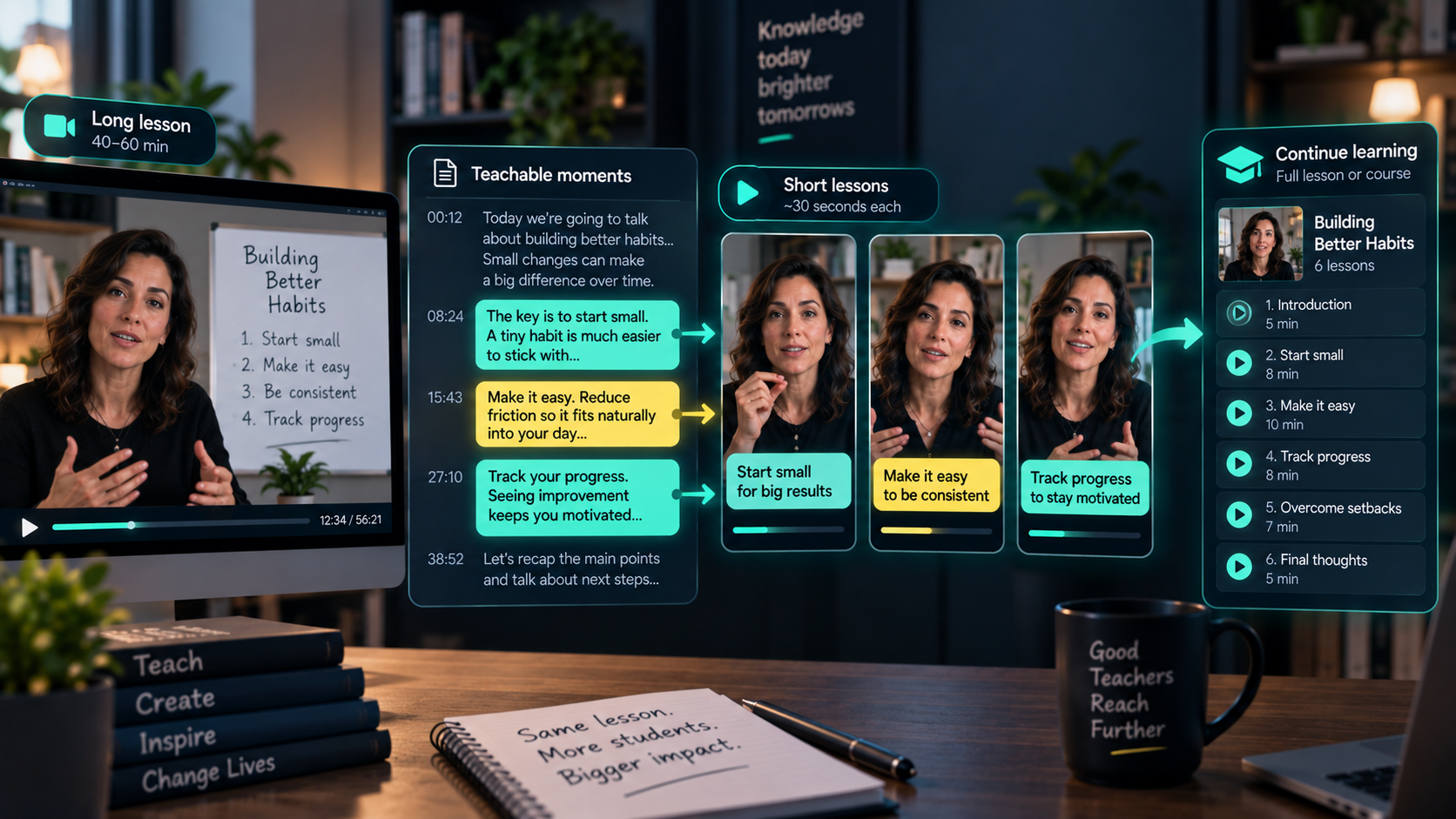
You already teach for an hour. A Short lets someone learn one thing in thirty seconds.
Start free with MintiStudio
Educators already create the perfect source material for Shorts
If you teach online, you are already producing exactly what Shorts need.
Lectures, tutorials, course modules, workshops, webinars, and live Q&As are full of moments where you explain one idea clearly, correct a common misunderstanding, or answer a question your students ask all the time.
Each of those moments can stand on its own as a short lesson.
The problem is rarely a lack of material. The problem is that your best explanations are buried inside a 40-minute video that a new student will never find on their own.
A Short gives that student a smaller way in. It lets them learn one useful thing from you before deciding whether they want the full lesson, the full course, or your channel.
A teaching Short should feel like one complete lesson
The easiest mistake is to grab any 30 seconds from a lecture and post it.
That usually feels like a fragment.
A strong teaching Short should feel like a small, complete idea. It does not need to cover the whole topic, but the viewer should walk away having actually learned one thing.
Before choosing a clip, ask:
- Does this moment teach one clear concept?
- Can a new student understand it without the full lesson?
- Does it start with the question, not the setup?
- Does it end in a clean place?
- Would this make someone curious about the full lesson or course?
You are not just trimming a video. You are choosing the explanation that best shows how you teach.
Start with the transcript, not the recording
Most educators try to find clips by re-watching the whole lesson.
That works, but it is slow, and it is a lot to sit through.
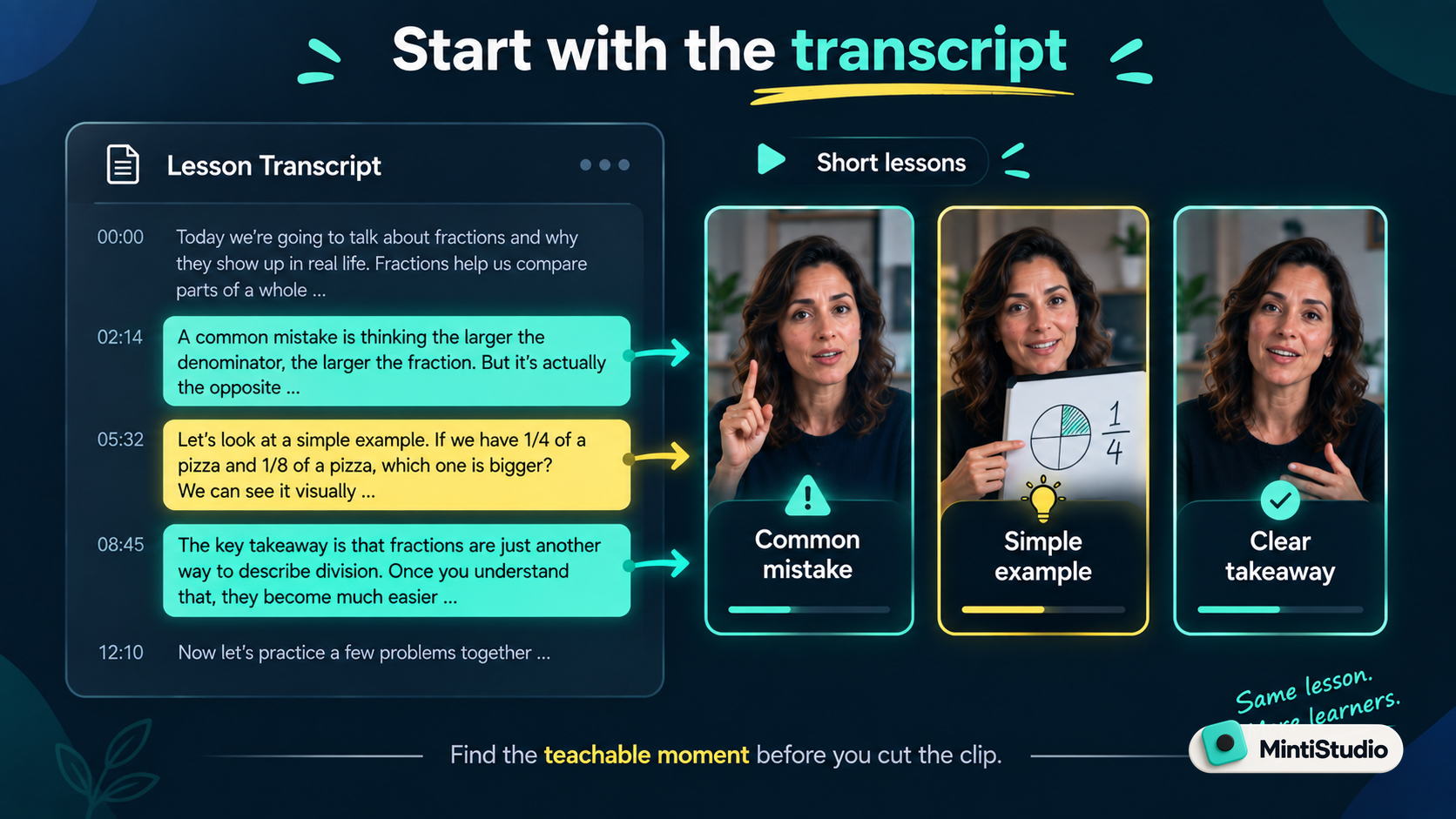
A transcript is faster. You can scan the lesson, search for the moments where you gave a clear explanation, and spot the concepts you return to again and again.
Look for moments like:
- a common mistake students make
- a simple way you explain a hard concept
- a step-by-step method or framework
- a clear answer to a question you get constantly
- a "most people get this wrong" correction
- a single takeaway that summarizes a bigger idea
These are the moments that make a new viewer think, "this person can actually teach me."
We wrote more about finding these moments in Video Clipping for Creators: How to Turn Long Videos into a Weekly Shorts Engine.
Teach one concept per Short
A single lesson usually covers many ideas.
That is good teaching in long form, but confusing in a Short.
For short-form clips, each video should teach one concept.
Instead of clipping a section that explains three things, pick the clearest one and build the Short around it.
A focused Short is easier to title, easier to follow, and easier for a student to remember and act on.
A good clip usually answers one question:
- Why does this concept confuse most beginners?
- What is the fastest way to understand this?
- What is the one mistake to avoid here?
- What should you learn first?
- What is the simplest example of this idea?
If the clip teaches one clear thing, it works far better than a clip that tries to teach everything.
Open with the question, not the intro
The first few seconds decide whether anyone learns anything.
In the Shorts feed, nobody searched for your lesson. Your clip appears while someone is scrolling.
So you cannot open the way you open a class:
"Okay, so before we get into this, let me give you a bit of background..."
That makes sense in a course. It is weak as a standalone Short.
Start where the learning starts:
"Most people multiply these in the wrong order. Here's the rule that fixes it."
That opening names the problem and gives the viewer a reason to stay and learn.
You do not need to be flashy. You just need to begin where the value begins.
Captions make your teaching easy to follow
For educators, captions do more than help accessibility.
Many students watch without sound, or in a noisy place. Many are non-native speakers who understand better when they can read along. And complex ideas are simply easier to absorb when the key terms are on screen.
A few practical rules:
- Keep lines short.
- Make the text large enough for mobile.
- Highlight only the key terms.
- Avoid covering diagrams or your face.
- Use enough contrast to stay readable.
The goal is not decoration. The goal is to make your explanation easy to follow in a few seconds.
You still decide what represents your teaching. We covered that balance in AI Can Suggest Your Clips. You Should Still Decide Which Ones Go Out..
Write titles that name what someone will learn
A teaching clip needs a little context.
The viewer may not know your subject or level, so the title has to do some work.
Skip vague titles like:
"A quick lesson"
Use something that names the learning:
"The One Grammar Rule That Fixes Most Mistakes"
Or:
"How to Solve This in Three Steps (Without Memorizing)"
The title does not need to be clever. It needs to make the right learner think, "I want to know that."
One lesson becomes a week of Shorts
One long lesson should not become a single Short.
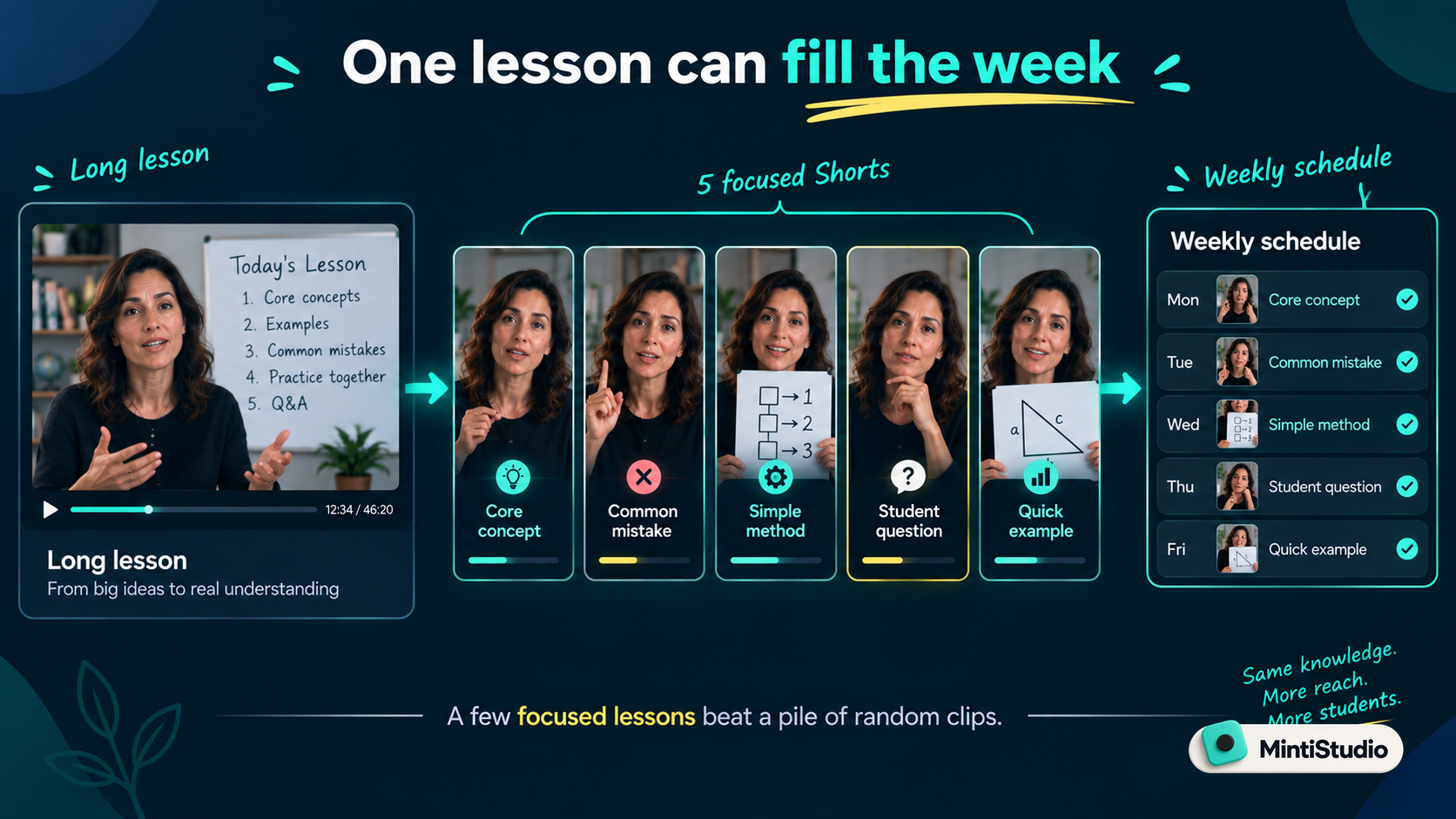 If the lesson was good, you can usually pull several focused clips from it.
For example, one course module might become:
- one clip with the core concept
- one clip with the most common mistake
- one clip with a simple method or framework
- one clip that answers a frequent student question
- one clip with a quick worked example
- one clip that points people to the full lesson or course
This is where teaching content becomes efficient.
You already did the hard work of preparing and recording the lesson. Shorts help far more people find it. We explored this in How to Repurpose Long Videos into Short Clips.
Let Shorts be the doorway to your course
Shorts work best for educators as discovery, not as the whole curriculum.
A stranger learns one useful thing. They see how clearly you explain it. They get a real sample of your teaching.
Then they might watch the full lesson, subscribe, join your email list, or enroll in your course.
That is the healthy role for Shorts.
They introduce your teaching. Your deeper work — full lessons, courses, and programs — is where the real learning and the real income live. If you are curious how that income side works for a smaller channel, we broke it down in How Creators Make Money From Shorts With a Small Channel, and made the broader case in Shorts Are Not the Whole Strategy. They Are the Entry Point..
Schedule clips instead of posting them all at once
After making several teaching Shorts, it is tempting to post them all in one day.
Usually it is better to spread them across the week.
This gives each lesson room to be seen and keeps your channel active without recording something new every day.
A simple weekly rhythm works well:
- Record or use one long lesson.
- Create three to five Shorts from it.
- Schedule them across the next several days.
- Watch which concepts get the strongest response.
- Use that signal when choosing clips from your next lesson.
We wrote more about this in The Weekly Shorts Workflow for Busy Creators.
Where MintiStudio helps
Turning lessons into Shorts sounds simple, but your time already goes into teaching and creating the courses themselves.
Doing it well means finding the teachable moments, trimming them cleanly, adding captions, writing titles, scheduling, and publishing — every week, on top of everything else you make. For one educator, that is often the part that quietly falls off the calendar.
MintiStudio comes in two tiers, and the difference matters:
- DIY lets you do it yourself. Start from a long lesson, review AI-suggested moments, create vertical clips, add readable captions, and schedule across YouTube, Reels, and Facebook — while staying in full control of what represents your teaching.
- Autopilot is the done-for-you tier, and this is the real difference. It is not a tool you have to learn and run yourself. It is a managed service that turns your long-form lessons into a steady stream of published Shorts for you, so your teaching keeps reaching new students even during your busiest weeks.
For an educator, consistency is what compounds. Autopilot keeps your best explanations circulating and keeps bringing new learners to your channel and courses — without you spending your evenings clipping.
You still decide what your teaching stands for. MintiStudio just makes sure the work actually gets done.
A simple educator's workflow
Here is a practical workflow you can use:
- Choose one strong lesson, module, or webinar.
- Review the transcript instead of re-watching the whole thing.
- Pick three to five moments that each teach one clear concept.
- Make sure each clip opens with the question or problem.
- Add readable captions.
- Write a title that names what the viewer will learn.
- Schedule the clips across the week.
- Track which concepts resonate most, and teach more of them.
You do not need to turn every minute into content.
Start with the explanations that best show how you teach.
A few focused lessons will always beat a pile of random clips.
Next step
Choose one recent lesson and find three moments where you explained something clearly.
Then turn those moments into captioned Shorts and schedule them across the week.
Related guides
- How Coaches Can Turn Long Videos into Shorts That Bring in Clients
- How to Make Shorts from Podcast Episodes
- How to Repurpose Long Videos into Short Clips
- The Weekly Shorts Workflow for Busy Creators
Start free with MintiStudio
More from the blog
YouTube Shorts for Consultants: A Practical Workflow for Public Proof Without Sharing Client Confidentials
Consultants often have strong expertise locked inside private calls, workshops, and explainers. This guide shows how to turn those long recordings into buyer-relevant Shorts that build public proof, while keeping confidential details out of the workflow.
Turn Prospect Objections into Your Next Teaching Video
Use the questions prospects ask on sales calls to plan teaching videos that answer real objections, show your thinking, and create standalone moments that can become Shorts. This guide gives coaches and consultants a simple way to turn one conversation topic into a useful long video and a set of clip-ready lessons.